Data Privacy Guide: Protection, Rights & Best Practices
Learn what data privacy is, current privacy laws (GDPR, CCPA), and how to protect your personal information online.
 Michael Gargiulo
Bottom Line: Your personal data faces constant threats from malware, phishing, social engineering, and network attacks. Strong passwords, privacy-focused tools, and a VPN that encrypts your traffic form the core defenses for protecting your information online.
Data privacy has become one of the most important topics in digital life. Every online purchase, search query, and social media post generates personal data that companies collect, store, and share. For many people, the question is simple: who controls my information, and how do I keep it safe?
The risks are real. Cybercriminals use sophisticated methods to steal personal data, and even legitimate companies sometimes mishandle it. But there is also good news. Strong privacy laws now exist in dozens of countries, and practical tools are available to help you take control. This guide covers the specific threats to your personal data, the laws designed to protect your rights, and the concrete steps you can take to defend your information online.
Note: This guide focuses on personal data privacy from a consumer perspective. If you’re looking for information on organizational compliance frameworks, corporate data handling obligations, or GDPR implementation for businesses, visit our data protection guide instead.
What Is Data Privacy?
Data privacy refers to your right to control how your personal information is collected, used, stored, and shared. Personal data includes anything that can identify you directly or indirectly: your name, email address, phone number, physical address, browsing history, purchase records, location data, and even biometric information like fingerprints.
In practical terms, data privacy answers three questions:
- Who collects your data? Websites, apps, advertisers, internet service providers (ISPs), and government agencies all collect personal information.
- What do they do with it? Common uses include targeted advertising, analytics, product improvement, and in some cases, selling data to third parties.
- What control do you have? Privacy laws and tools give you the ability to view, modify, delete, and restrict access to your data.
The gap between what companies collect and what users understand about that collection remains one of the biggest challenges in digital privacy, according to the Electronic Frontier Foundation (EFF). Data privacy is not the same as data protection, which deals with the organizational and legal frameworks businesses must follow. Data privacy is about your individual rights and choices.
Threats to Your Personal Information
Cybercriminals employ a wide range of techniques to access personal data. Understanding how each threat works is the first step toward defending against it.
Social Engineering
Social engineering is a category of attacks where criminals manipulate people into revealing confidential information. Rather than exploiting software vulnerabilities, these attacks exploit human psychology.
How it works: An attacker might impersonate a bank representative, send a fake charity appeal, or create an urgent scenario (like claiming your account has been compromised) to pressure you into sharing passwords, account numbers, or verification codes.
Real-world example: In 2020, Twitter experienced a major breach when attackers used phone-based social engineering to convince employees to provide access to internal tools. The attackers then hijacked high-profile accounts including those of Barack Obama and Elon Musk to promote a cryptocurrency scam.
Prevention: Verify any unexpected request for personal information by contacting the organization directly through official channels. Never share passwords or one-time codes with anyone who contacts you first.
Malware
Malware is malicious software designed to infiltrate devices and steal data, encrypt files for ransom, or monitor user activity without consent.
How it works: Malware typically arrives through email attachments, compromised websites, or infected downloads. Once installed, it can log keystrokes to capture passwords, encrypt your files and demand payment (ransomware), activate your camera or microphone, or exfiltrate sensitive documents.
Real-world example: The 2017 WannaCry ransomware attack affected over 200,000 computers across 150 countries, encrypting users’ files and demanding Bitcoin payments. Hospitals, businesses, and government agencies were all impacted.
Prevention: Keep your operating system and software updated, avoid clicking links or attachments from unknown senders, and use reputable antivirus software. Our dedicated guide covers malware types and defenses in detail.
Spear Phishing
While standard phishing casts a wide net, spear phishing targets specific individuals using personal information the attacker has already gathered.
How it works: An attacker researches you through social media, public records, or previous data breaches. They then craft a highly personalized message, often appearing to come from a colleague, boss, or trusted service, that tricks you into clicking a malicious link or providing sensitive data.
Real-world example: A 2023 report from Barracuda Networks found that spear phishing accounts for less than 0.1% of all email attacks but is responsible for 66% of all breaches. The personalization makes these attacks far more effective than generic phishing.
Prevention: Be suspicious of any email requesting urgent action, even if it appears to come from someone you know. Verify requests through a separate communication channel. Read our detailed guide on phishing attacks for more protection strategies.
Network Attacks
Public Wi-Fi networks in coffee shops, airports, and hotels are convenient but inherently insecure. Attackers on the same network can intercept unencrypted data transmissions.
How it works: In a man-in-the-middle (MITM) attack, a hacker positions themselves between your device and the Wi-Fi router. They can then monitor your browsing activity, capture login credentials, and even inject malicious content into the websites you visit.
Real-world example: Security researchers have documented that rogue hotspots mimicking legitimate networks (known as “evil twin” attacks) remain one of the most common threats in public spaces. The NIST Privacy Framework outlines technical controls to counter these attacks.
Prevention: Avoid accessing banking or sensitive accounts on public Wi-Fi. Use a VPN to encrypt your connection, and ensure websites use HTTPS before entering any personal information.
Internet of Things (IoT) Vulnerabilities
Smart home devices, wearables, older phones, and connected appliances often have weak security defaults and receive infrequent software updates.
How it works: Many IoT devices ship with default passwords that users never change. These devices often lack encryption and may transmit data in plain text. Attackers can exploit these weaknesses to access your home network and any data stored on connected devices.
Real-world example: In 2019, researchers discovered that certain smart doorbells were transmitting Wi-Fi passwords in plain text, allowing anyone within range to capture network credentials.
Prevention: Change default passwords on all connected devices immediately. Regularly check for firmware updates and disable features you do not use, such as remote access.
Social Media Exploitation
Social media platforms collect vast amounts of user data, and the information you voluntarily share can be weaponized by attackers.
How it works: Attackers scrape public profiles to gather personal details for social engineering or spear phishing campaigns. Platforms themselves collect behavioral data including your likes, shares, location check-ins, and browsing patterns for targeted advertising. Data breaches at social media companies can expose this information to criminals.
Real-world example: The 2018 Cambridge Analytica scandal revealed that data from approximately 87 million Facebook users had been harvested without consent and used for political advertising.
Prevention: Audit your privacy settings on every platform. Limit the personal information visible on public profiles and be cautious about accepting connection requests from unknown accounts.
Deepfakes and Synthetic Media
Advances in artificial intelligence have made it possible to create convincing fake images, audio, and video that can damage reputations or facilitate fraud.
How it works: AI tools can generate realistic synthetic media using samples of a person’s voice, face, or writing style. Criminals use deepfakes for impersonation, blackmail, disinformation campaigns, and financial fraud such as voice-cloning scams.
Real-world example: In 2024, a finance employee at a multinational company transferred $25 million after a video call with what appeared to be the company’s CFO. The entire call was a deepfake.
Prevention: Be cautious of any unusual video or audio requests involving financial transactions. Verify unexpected communications through established channels. Use multi-factor authentication so that voice or video alone cannot authorize sensitive actions.
What Data Can Be Targeted?
Cybercriminals target different types of personal information depending on their goals. Common targets include names, addresses, phone numbers, Social Security numbers, financial account details, medical records, and login credentials. Here is what attackers typically do with stolen data:
Identity Theft
Criminals use stolen personal information to impersonate victims. They may open credit accounts, file fraudulent tax returns, obtain medical treatment, or commit crimes under someone else’s name. Americans reported losing over $10 billion to fraud in 2023, according to the Federal Trade Commission. Learn how identity theft works and how to protect yourself.
Doxxing
Doxxing involves publishing someone’s private information publicly without consent. This can include home addresses, phone numbers, workplace details, and family information. Victims may face harassment, threats, or physical danger as a result.
Sale on the Dark Web
Stolen data is frequently sold on dark web marketplaces. A Social Security number may sell for as little as $1, while complete identity packages (name, address, SSN, bank details) can fetch $30 or more. Medical records are particularly valuable, often selling for $250 or more per record.
Financial Exploitation
Attackers use stolen credit card numbers, bank account credentials, and personal details to make unauthorized purchases, transfer funds, or apply for loans in the victim’s name.
Extortion and Blackmail
Sensitive personal data, including private photos, messages, or browsing history, can be used to threaten victims into making payments. Ransomware attacks encrypt files and demand payment for their release.
Personal Exploitation
Stolen data enables stalking, harassment, and impersonation. Criminals may use personal information to track a victim’s location, contact their family or employer, or commit crimes under the victim’s identity.
Consumer Rights Under Data Privacy Laws
Data privacy laws establish the rules governing how organizations collect, store, process, and share personal information. These laws also define your rights as an individual and set penalties for violations.
Why Privacy Laws Matter
The rapid growth of digital data collection created an urgent need for legal protections. Data privacy laws serve several critical functions:
- Protect individuals from unauthorized use of their personal information
- Grant specific rights including the ability to access, correct, and delete your data
- Require transparency from organizations about how they handle data
- Mandate breach notifications so individuals can take protective action
- Impose penalties that incentivize compliance
The NIST Privacy Framework provides additional guidance that many organizations use alongside these legal requirements.
| Regulation | Region | Effective Date | Max Penalty |
|---|---|---|---|
| GDPR | European Union | May 25, 2018 | €20M or 4% of global revenue |
| CCPA | California, USA | January 1, 2020 | $2,500–$7,500 per incident |
| PDPA | Singapore | July 2, 2014 | SGD 1 million |
| LGPD | Brazil | August 15, 2020 | 2% of Brazil revenue, capped at 50M reais |
| PIPEDA | Canada | April 13, 2000 | Decided by Privacy Commissioner |
| Various State Laws | USA (NJ, NH, MT, FL, TX, OR) | 2024–2025 | Varies by state |
General Data Protection Regulation (GDPR)
- Region: European Union (EU)
- Effective Date: May 25, 2018
Key Provisions
- Consent: Requires explicit consent from individuals before processing their data. The full legal text is available at gdpr-info.eu.
- Data Subject Rights: Grants rights to access, correct, erase, and restrict the processing of personal data.
- Data Breach Notification: Organizations must report data breaches within 72 hours.
- Penalties: Up to €20 million or 4% of annual global revenue, whichever is higher.
California Consumer Privacy Act (CCPA)
- Region: California, USA
- Effective Date: January 1, 2020
Key Provisions
- Right to Know: Consumers can request details about how their personal information is collected, used, and shared.
- Right to Delete: Consumers can request deletion of their personal information.
- Opt-Out Rights: Consumers can opt out of the sale of their personal data.
- Penalties: Fines range from $2,500 to $7,500 per violation.
Personal Data Protection Act (PDPA) — Singapore
- Region: Singapore
- Effective Date: July 2, 2014
Key Provisions
- Consent: Requires organizations to obtain agreement before collecting, using, or disclosing personal data.
- Access and Correction: Grants individuals the right to access and correct their personal information.
- Data Security: Organizations must implement reasonable security arrangements to protect personal data.
- Penalties: Fines up to SGD 1 million.
Brazilian General Data Protection Law (LGPD)
- Region: Brazil
- Effective Date: August 15, 2020
Key Provisions
- Consent: Requires clear and explicit consent for data processing.
- Data Subject Rights: Provides rights to access, edit, delete, and port personal information.
- Data Protection Officer: Organizations must appoint a data protection officer.
- Penalties: Up to 2% of the company’s revenue in Brazil, capped at 50 million reais per violation.
Personal Information Protection and Electronic Documents Act (PIPEDA) — Canada
- Region: Canada
- Effective Date: April 13, 2000 (with amendments over time)
Key Provisions
- Consent: Requires organizations to obtain meaningful consent for data collection and use.
- Access and Correction: Grants individuals the right to access and correct their personal information.
- Data Security: Organizations must protect personal data with appropriate safeguards.
- Penalties: Determined by the Office of the Privacy Commissioner.
New State Privacy Laws in the United States
- States: Various, including New Jersey, New Hampshire, Montana, Florida, Texas, and Oregon
- Effective Dates: Various dates in 2024 and 2025
Key Provisions
- Consent: Similar requirements for obtaining consent before data processing.
- Data Subject Rights: Rights to access, edit, delete, and opt out of data processing.
- Data Security: Requirements for protecting personal data and conducting data protection assessments.
- Penalties: Vary by state, including fines and enforcement actions by state authorities.
Tip: The single most effective habit is limiting what you share online in the first place. Combine strong unique passwords, encrypted cloud storage, and a VPN on public Wi-Fi, and you remove most of the attack surface criminals rely on.
Ways to Protect Your Personal Information
The threats are real, but so are the defenses. Here are specific, actionable steps to protect your personal data online.
Use Privacy-Friendly Browsers
Standard browsers collect significant amounts of user data. Privacy-focused alternatives like Brave, Firefox (with strict tracking protection enabled), and the Tor Browser block trackers and ads by default. Brave blocks over 15 types of trackers automatically, while Tor routes traffic through multiple encrypted nodes to prevent surveillance.
Limit Data Sharing
Every piece of personal information you share online increases your exposure. Avoid posting your full name, home address, phone number, or workplace on public profiles. Review the permissions you grant to apps and revoke access to your contacts, location, and camera when not needed.
Encrypt Cloud Storage
If you store files in the cloud, use services that offer end-to-end encryption such as Tresorit or Proton Drive. For existing cloud storage accounts (Google Drive, Dropbox), encrypt sensitive files locally before uploading using tools like Cryptomator.
Use a Device Finder
Enable Find My Device (Android) or Find My iPhone (iOS) on all your devices. If a device is lost or stolen, these tools allow you to remotely lock the device and erase all personal data before it falls into the wrong hands.
Review App Permissions
Many apps request access to your camera, microphone, contacts, and location data far beyond what they need to function. On both iOS and Android, review app permissions in your device settings and revoke any that seem unnecessary. Pay special attention to apps that request microphone or camera access while running in the background.
Install Ad Blockers
Browser extensions like uBlock Origin block tracking scripts, intrusive ads, and known malware domains. Ad blockers reduce the amount of data third parties can collect about your browsing behavior and also improve page load speeds.
Use Privacy-Focused Messaging Apps
Standard SMS messages are not encrypted. Apps like Signal use end-to-end encryption by default for all messages, voice calls, and video calls. This means that even the app provider cannot read your conversations.
Use Secure Email Services
Email providers like ProtonMail and Tutanota offer end-to-end encryption, unlike standard Gmail or Outlook accounts where the provider can technically access message content.
Create Strong, Unique Passwords
The most commonly used password in 2024 is still “123456.” Use a password manager to generate and store unique passwords for every account. A strong password is at least 16 characters and includes uppercase letters, lowercase letters, numbers, and symbols. Enable multi-factor authentication (MFA) on every account that supports it.
Use App Locks
Many smartphones offer the ability to lock individual apps with a separate PIN, pattern, or biometric scan. This adds a second layer of protection if someone gains access to your accessed device.
Regularly Clear Your Browsing Data
Clear your browsing history, cookies, and cached data on a regular schedule. This removes stored tracking data and reduces the information available to anyone who accesses your device. Most browsers allow you to automate this process through settings.
Disable Third-Party Cookies
Modern browsers including Chrome, Firefox, and Safari allow you to block third-party cookies, which are primarily used to track your activity across different websites. Disabling them significantly reduces cross-site tracking. Check your browser’s privacy settings to configure this.
Enable Do Not Track Requests
While not all websites honor Do Not Track (DNT) requests, enabling this setting in your browser signals your preference not to be tracked. Combine this with disabling unnecessary location and notification permissions on mobile devices.
Isolate Online Activities
Use separate browsers or browser profiles for different activities. Keep personal browsing in one profile and work or shopping in another. This prevents tracking networks from building a complete picture of your online behavior.
Secure Your IoT Devices
Change default passwords on every connected device immediately after setup. Check for firmware updates monthly. Disable remote access features you do not use, and consider placing IoT devices on a separate Wi-Fi network from your main devices.
Using Encryption Tools to Protect Your Connection
Encryption is the most effective technical defense for personal data in transit. Several tools work together to protect different aspects of your online activity.
Virtual Private Networks (VPNs)
A VPN encrypts all internet traffic between your device and the VPN server, preventing your ISP, network administrators, and attackers on public Wi-Fi from monitoring your activity. VPNs also mask your IP address, making it harder for websites and advertisers to track your location.
When choosing a VPN, prioritize providers with verified no-log policies, strong encryption standards (AES-256), and a wide server network. Compare top providers based on speed, security, and privacy features on our VPN reviews page.
NordVPN is one of the top-rated options for personal privacy. It uses AES-256 encryption, has passed multiple independent audits of its no-log policy, and offers built-in malware and ad blocking through its Threat Protection feature. NordVPN supports up to 10 simultaneous device connections and maintains over 6,400 servers in 111 countries.
Encrypted DNS
Standard DNS queries are sent in plain text, allowing your ISP to see every website you visit. Switching to encrypted DNS (DNS over HTTPS or DNS over TLS) through providers like Cloudflare (1.1.1.1) or Quad9 prevents this surveillance.
HTTPS Everywhere
Always verify that websites use HTTPS before entering personal information. Modern browsers display a padlock icon in the address bar for encrypted connections. The HTTPS Everywhere extension (now built into many browsers) automatically upgrades connections to HTTPS when available.
Private Browsers and Search Engines
Combine your VPN with a privacy-focused browser like Brave or Firefox and a search engine like DuckDuckGo that does not track search queries. This layered approach provides significantly stronger privacy than any single tool alone.
Key Takeaways
Personal data privacy is not optional in today’s digital environment. Every online action generates data that can be collected, shared, sold, or stolen. The threats are specific and well-documented, from phishing and malware to social engineering and IoT vulnerabilities.
The defenses are equally specific. Strong, unique passwords managed by a password manager eliminate the most common attack vector. A VPN encrypts your traffic and prevents network surveillance. Privacy-focused browsers and encrypted messaging apps reduce the data available to trackers and attackers. And data privacy laws like GDPR and CCPA give you legal rights to control your information.
The most effective approach combines multiple layers: limit what you share, encrypt what you transmit, secure what you store, and stay informed about evolving threats. No single tool provides complete protection, but together these measures significantly reduce your risk. Take one step today, whether that means auditing your app permissions, enabling multi-factor authentication, or setting up a VPN, and build from there.
Resources for this page
Charts and reference images from our testing, free to view and share.
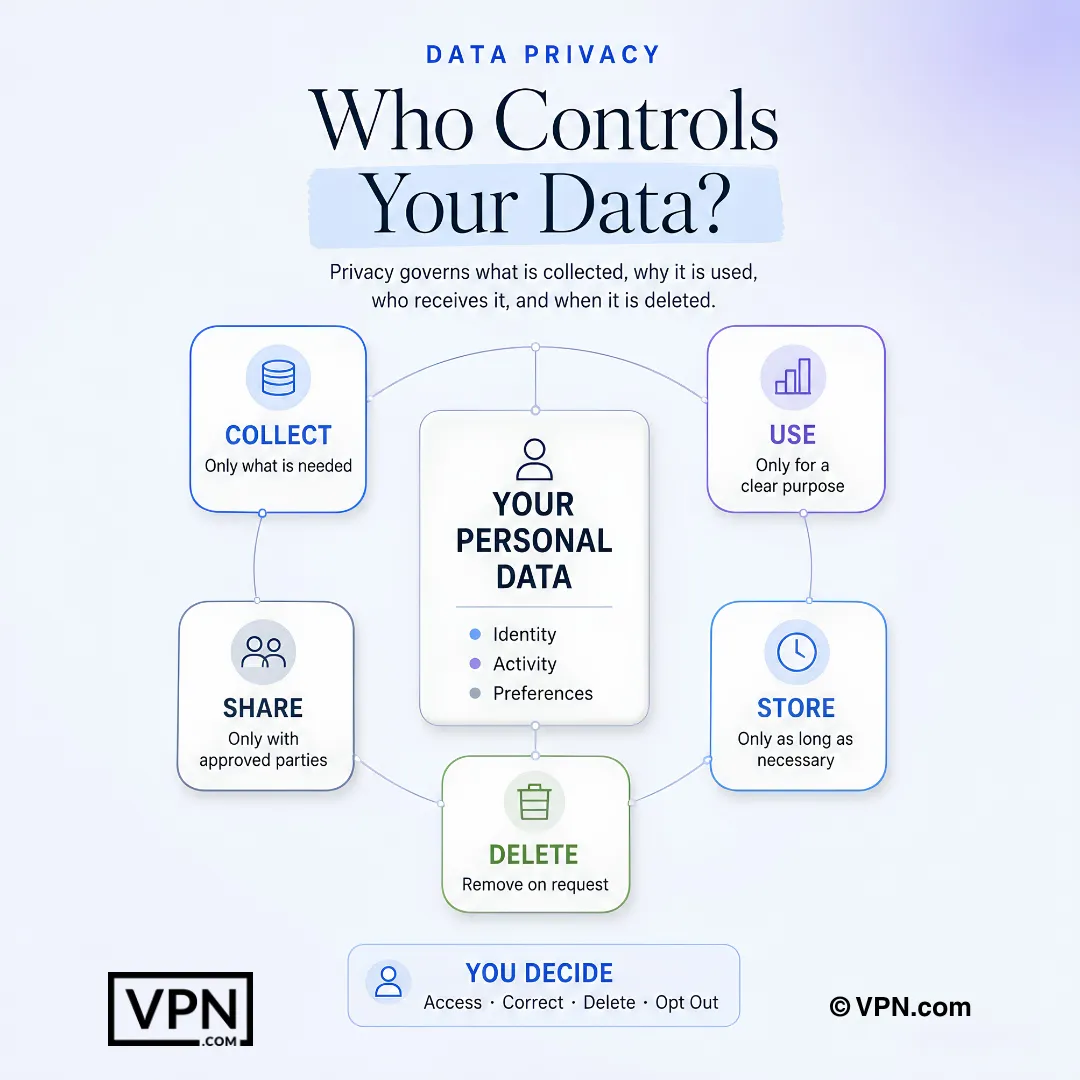
Data privacy determines what information is collected, how it is used, who receives it, and when it is deleted.
Frequently Asked Questions
What’s the difference between data privacy and data protection?
Data privacy is your individual right to control how personal information like your name, browsing history, or location data gets collected, used, and shared. Data protection covers the organizational and legal frameworks businesses must follow to handle that data responsibly. For personal privacy, focus on tools like VPNs and password managers rather than corporate compliance frameworks.
How dangerous is spear phishing compared to regular phishing?
Spear phishing is far more dangerous despite being much rarer. A 2023 Barracuda Networks report found spear phishing accounts for less than 0.1% of all email attacks but causes 66% of all breaches, because attackers research targets through social media and prior data breaches to craft convincing, personalized messages. Verify urgent requests through a separate communication channel before acting.
Can social engineering really compromise major accounts, not just individuals?
Yes. In 2020, Twitter suffered a breach when attackers used phone-based social engineering to convince employees to hand over access to internal admin tools, then hijacked high-profile accounts including Barack Obama’s and Elon Musk’s to promote a cryptocurrency scam. It shows social engineering exploits human psychology, not software flaws, so verifying requests through official channels matters.
How real is the deepfake threat to personal and financial data?
It’s an active, costly threat. In 2024, a finance employee at a multinational company transferred $25 million after a video call with what turned out to be an AI-generated deepfake of the company’s CFO. Criminals use cloned voices and faces for blackmail and fraud. Multi-factor authentication helps because it prevents voice or video alone from authorizing sensitive transactions.
Are smart home and IoT devices a real privacy risk?
Yes. Many IoT devices ship with default passwords users never change and transmit data without encryption. In 2019, researchers found certain smart doorbells transmitting Wi-Fi passwords in plain text, letting anyone within range capture network credentials. Change default passwords immediately after setup, check firmware monthly, and disable unused remote access features.
What actually happens to my data after a breach?
Stolen data is commonly sold on dark web marketplaces, where a Social Security number can go for as little as $1, a full identity package (name, address, SSN, bank details) for $30 or more, and medical records for $250 or more. Criminals then use it for identity theft; the FTC reported Americans lost over $10 billion to fraud in 2023.
What rights does GDPR actually give me over my personal data?
GDPR, effective since May 25, 2018 across the EU, grants rights to access, correct, erase, and restrict processing of your personal data, and requires organizations to get explicit consent before collecting it. Companies must report data breaches within 72 hours. Violations carry penalties up to €20 million or 4% of global annual revenue, whichever is higher.
How does CCPA differ from GDPR for consumers?
CCPA, effective January 1, 2020 in California, gives consumers a right to know what personal information is collected, a right to delete it, and a right to opt out of its sale, with violations fined $2,500 to $7,500 per incident. That’s narrower than GDPR’s €20 million/4%-of-revenue structure but still gives US consumers concrete opt-out leverage.
How does a VPN protect my personal data specifically?
A VPN encrypts all traffic between your device and its server, blocking your ISP and attackers on public Wi-Fi from monitoring activity, and masks your IP address to hinder location tracking. NordVPN, for example, uses AES-256 encryption, has passed multiple independent no-log audits, runs 6,400+ servers in 111 countries, and covers 10 simultaneous devices.
What tools protect my communications beyond a VPN?
Layer encryption across channels. Signal encrypts messages, voice, and video calls end-to-end by default so even the app provider can’t read them. ProtonMail and Tutanota offer end-to-end encrypted email, unlike standard Gmail or Outlook. Encrypted DNS through Cloudflare (1.1.1.1) or Quad9 stops your ISP from logging every site you visit in plain text.
What makes a password actually strong in 2024?
Length and randomness matter most: aim for at least 16 characters mixing uppercase, lowercase, numbers, and symbols. Despite this, “123456” remained the most commonly used password in 2024. Use a password manager to generate and store unique credentials per account, and enable multi-factor authentication everywhere it’s offered so a leaked password alone can’t grant access.
How do I protect my data on public Wi-Fi specifically?
Avoid logging into banking or sensitive accounts on public networks, since attackers on the same Wi-Fi can run man-in-the-middle attacks or set up “evil twin” rogue hotspots mimicking legitimate networks. Use a VPN to encrypt your connection and confirm sites use HTTPS before entering personal information. The NIST Privacy Framework outlines technical controls against these network attacks.
What’s the single most effective habit for reducing my privacy risk?
Limiting what you share online in the first place, since every posted detail expands what attackers can use for spear phishing or doxxing. Combine that with strong unique passwords, encrypted cloud storage tools like Proton Drive or Tresorit, and a VPN on public Wi-Fi. Together these remove most of the attack surface criminals rely on.