Our answer#1 of 3

NordVPN
Best for TeamsNordLayer for teams · central management · audited no-logs.
Get NordVPN30-day money-back guarantee
Decision guide · Updated September 2026
A business VPN is a baseline for any team handling remote access or sensitive data. The picks balance central management, security, and price.
NordVPN
Best for TeamsNordLayer for teams · central management · audited no-logs.
Get NordVPNThe ranking
Ordered by our overall score, aggregated from independent testing labs.


Our rankings are consistent with independent testing from Security.org[1], TechRadar[2], eSecurity Planet[3], and ProPrivacy[4].
A business VPN encrypts your company’s internet traffic and shields sensitive data from cyberattacks. If your team works remotely, accesses cloud services, or handles confidential information, a VPN is a security requirement.
This page is the hub for all VPN.com business coverage. It covers small and mid-sized teams (5–500 users) that need multi-seat licensing, centralized admin controls, and compliance support. For organizations with 500+ seats, dedicated compliance teams, or custom SLAs, see our enterprise VPN guide. For teams focused purely on connecting remote workers to a private network, our remote access VPN guide narrows the field further.
Unlike consumer VPN roundups, every recommendation on this page is evaluated against business-specific criteria: admin consoles, multi-seat licensing, SSO and MFA support, device compliance checks, and regulatory framework alignment. A provider that scores well for personal browsing may fail entirely for organizational use.
Consumer VPNs hide your IP and help you browse privately. Business VPNs protect an entire organization.
A business VPN supports multiple users under one account. It provides a centralized admin dashboard for managing devices, permissions, and security policies. It typically includes SSO, MFA, and device compliance checks.
Business VPNs also offer dedicated servers and IP addresses. These keep your company traffic separate from public traffic. They prevent your IPs from getting blacklisted by banks or cloud platforms.
| Feature | Consumer VPN | Business VPN |
|---|---|---|
| User accounts | Single user | Multi-seat licensing (5–500+) |
| Admin controls | None | Centralized dashboard |
| Authentication | Username/password | SSO, MFA, device compliance |
| IP addresses | Shared pool | Dedicated or static IPs |
| Compliance support | None | HIPAA, GDPR, SOC 2 |
| Billing | Per-individual | Per-seat invoicing, volume discounts |
| Support | Email/chat | Priority SLA, dedicated account manager |
Remote Access VPN: The most common type. It lets individual employees connect securely to your company network from anywhere. Think of it as a private tunnel between their device and your office. Our remote access VPN guide covers the top picks and setup steps.
Site-to-Site VPN: This connects entire office networks to each other. If your company has branches in different cities or countries, a site-to-site VPN links them so they function like one unified network. It runs continuously and requires no action from employees.
Cloud VPN: Instead of routing traffic through physical hardware, a cloud VPN runs through a provider’s cloud infrastructure. It scales faster, requires less in-house setup, and works well for companies already relying on SaaS platforms.
Zero Trust Network Access (ZTNA): ZTNA verifies every user and device before granting access to specific resources. It does not grant blanket network access. Gartner projects that by 2025, 70% of new remote-access deployments will use ZTNA over traditional VPNs. NordLayer already ships ZTNA-aligned features (device posture checks, micro-segmentation, identity-based access) inside its VPN platform. If your team needs granular per-app permissions rather than full network tunnels, NordLayer’s ZTNA mode offers a practical bridge. Pure-play ZTNA vendors like Zscaler Private Access and Cloudflare Access target larger deployments, but they fall outside VPN scope.
Choosing the right VPN matters. Every provider promises speed and 99.9% uptime. Reality varies. Here is what to prioritize:
AES-256 encryption is the standard. Stick with modern protocols like WireGuard or OpenVPN. Avoid providers still using PPTP or L2TP. Both have known vulnerabilities that put business data at risk.
A solution that works for 10 employees should also handle 100. Cloud-based VPNs scale more smoothly than on-premise setups. For teams scaling beyond 100 users, enterprise VPN solutions cover dedicated infrastructure and advanced management options.
Every VPN introduces some slowdown due to encryption overhead and routing. The best providers keep speed loss to 10–15%. Anything worse hurts productivity. We test download, upload, and latency on WireGuard and OpenVPN from three global locations to produce comparable results.
Your IT admin needs one dashboard to onboard employees, set permissions, monitor activity, and enforce policies. Without this, managing a VPN becomes a burden. A VPN only works if every employee uses it. Clear usage policies are essential.
If you handle sensitive data, your VPN should support relevant frameworks: HIPAA for healthcare, GDPR for European operations, SOC 2 for finance. Avoid providers headquartered in Five Eyes countries where data handover can be compelled. Understanding where VPNs are legal also matters if your team operates across multiple jurisdictions.
Split tunneling lets employees route only business traffic through the VPN. Personal traffic goes directly to the internet. This preserves bandwidth and reduces latency for non-sensitive tasks.
Compare providers on total value, not sticker price alone. A slightly more expensive provider with better speed, security, and management tools saves money by preventing costly breaches. Never use a free VPN for business. Free providers often monetize your data, offer weak encryption, and lack management features.
We evaluated 14 business VPN providers across five weighted categories. Each provider received a score out of 100.
| Category | Weight | What We Measured |
|---|---|---|
| Security & Encryption | 30% | Protocol support, encryption standard, kill switch reliability, DNS/IP leak results, independent audit history |
| Admin & Management | 25% | Dashboard usability, SSO/MFA options, device compliance enforcement, per-user permission granularity |
| Speed & Reliability | 20% | Download/upload speed loss on WireGuard and OpenVPN from US, EU, and APAC test servers; uptime over 30 days |
| Compliance & Privacy | 15% | Supported frameworks (HIPAA, GDPR, SOC 2, ISO 27001), headquarters jurisdiction, no-logs audit status |
| Value & Scalability | 10% | Per-seat cost at 10, 50, and 100 users; contract flexibility; free trial availability; team-size fit |
Speed tests ran on a 500 Mbps baseline connection using a dedicated testing machine. We measured each provider three times per server location and averaged the results. DNS leak checks used both browser-based and CLI tools. Kill switch tests involved forcibly dropping the VPN tunnel mid-transfer.
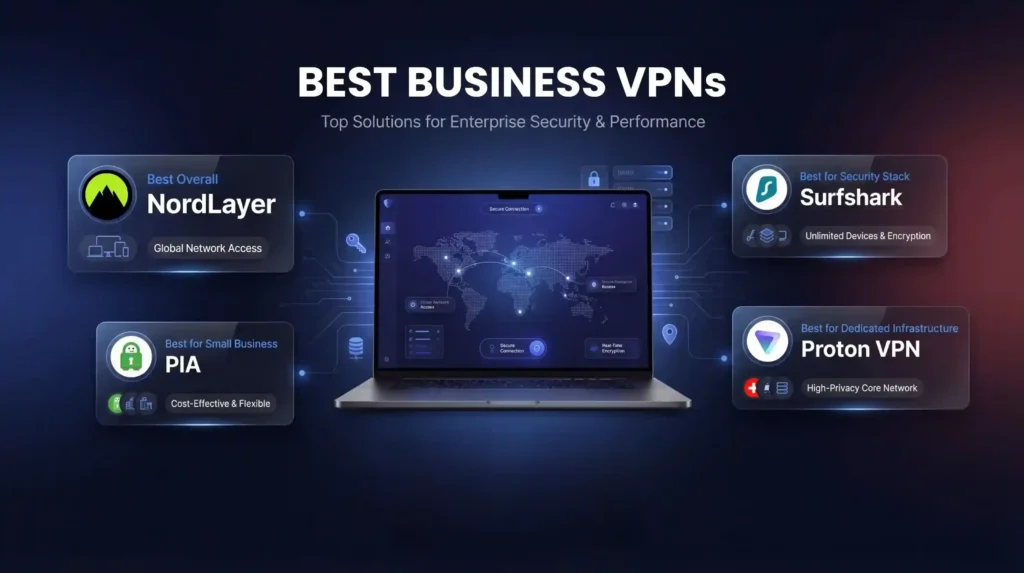
After testing 14 providers against the methodology above, these four earned recommendation status.
| Provider | Best For | Monthly Price (per user) | Servers | Speed Loss (Download) | Admin Dashboard | Compliance | Overall Score |
|---|---|---|---|---|---|---|---|
| NordLayer | Overall (10–500 users) | $8–$14 | 8,000+ | ~5% (NordLynx) | Full (SSO, MFA, device posture) | SOC 2, GDPR, HIPAA | 92/100 |
| Surfshark | Security bundles (10–100 users) | $5.90–$6.90 | 4,500+ | ~8% download | Basic team management | GDPR | 84/100 |
| Proton VPN | Dedicated infra (25–200 users) | $6.99–$19.99 | 18,000+ | Under 8% | Moderate (dedicated IP management) | ISO 27001, SOC 2 Type II, GDPR, HIPAA | 88/100 |
| PIA | Small business (2–25 users) | $3.33 | 35,000+ | ~15% | Minimal | GDPR | 76/100 |
NordLayer is built by the NordVPN team specifically for organizational use. It includes always-on VPN, Firewall as a Service, SSO integration, and AES-256 encryption with the NordLynx protocol.
Admin controls stand out. The dashboard lets IT managers segment teams, enforce device posture checks, and apply per-user access rules. Onboarding a new employee takes under 3 minutes. Activity logs export to SIEM tools for compliance reporting.
Speed performance is the strongest in our tests. NordLynx (WireGuard-based) averaged just 5% download speed loss across US and EU servers. Latency stayed under 12 ms on regional connections.
Pricing runs $8/user/month on the Basic plan (up to 50 users) and $14/user/month on the Advanced plan, which adds ZTNA features, device posture checks, and a dedicated account manager. Enterprise plans for 50+ users are available with custom pricing. A 14-day free trial requires no credit card.
Team-size fit: 10–500 users. Below 10, the per-seat cost may not justify the dashboard overhead. Above 500, talk to their enterprise sales team for custom SLAs.
Limitations: No Linux GUI client. Mobile app lacks split tunneling on iOS.
Surfshark pairs its VPN with built-in antivirus and a data breach monitoring service. The breach monitor tracks exposed emails, payment cards, and employee IDs across dark web databases.
Security architecture runs on RAM-only servers that wipe all data on reboot. This eliminates persistent storage risks. Independent audits by Cure53 confirmed the no-logs policy.
Speed results showed 8% download speed loss on WireGuard, which is competitive. However, upload speeds dropped up to 50% in our tests. This is a real concern if your team uploads large files, video assets, or database backups.
Pricing is aggressive: $5.90/user/month for VPN only, $6.90/user/month for the Surfshark One bundle (VPN + antivirus + breach alerts + private search). No minimum seat requirement.
Team-size fit: 10–100 users. The admin dashboard handles basic team management but lacks the granular per-user controls and SSO depth of NordLayer. Teams above 100 may outgrow it.
Limitations: Upload speed penalty is significant. No dedicated IP option at the business tier. Admin controls are thinner than NordLayer or Proton VPN.
Proton VPN offers dedicated servers and IP addresses in 15 countries. Dedicated IPs prevent blacklisting, reduce spam-flagging of business emails, and give cloud services a consistent identity to trust.
Compliance credentials are the deepest in our lineup. Proton is Swiss-based with no data retention requirements. It holds ISO 27001, SOC 2 Type II, GDPR, and HIPAA certifications. For healthcare companies, financial firms, or legal practices, this matters.
Speed performance measured under 8% download loss on WireGuard across all test locations. Upload performance remained stable, unlike Surfshark.
Pricing ranges from $6.99/user/month (VPN Plus) to $19.99/user/month (Proton Business Suite, which bundles encrypted email, calendar, and cloud storage). Special pricing is available for journalists and nonprofits. Minimum 5 seats on business plans.
Team-size fit: 25–200 users. Below 25, PIA offers similar functionality at lower cost. Above 200, NordLayer’s dashboard scales better.
Limitations: Dedicated IPs available in only 15 countries. Dashboard is functional but less polished than NordLayer’s. No ZTNA features.
PIA has the largest server network of any provider in our roundup at 35,000+ servers across 91 countries. All software is open source, so your team can audit the code independently.
Value proposition is clear: $3.33/user/month makes PIA the cheapest option by a wide margin. Each account covers 10 simultaneous device connections, which stretches further for micro-teams.
Security uses AES-256 with WireGuard and OpenVPN support. A verified no-logs policy has been tested in court (twice). The kill switch performed reliably in our drop tests.
Speed results showed approximately 15% download speed loss, the highest in our group. For email, document collaboration, and web browsing, this is acceptable. For video conferencing or large file transfers, it may create friction.
Team-size fit: 2–25 users. PIA lacks a centralized admin dashboard, SSO integration, and per-user permission controls. For teams above 25, managing individual accounts becomes impractical.
Limitations: No admin dashboard. Mac performance varies more than Windows in our tests. No SSO or MFA enforcement at the platform level. 30-day money-back guarantee included.
| Team Size | Primary Recommendation | Why |
|---|---|---|
| 2–10 users | PIA | Lowest cost, 10 devices per account, open-source audit trail |
| 10–50 users | NordLayer Basic | Full admin dashboard, SSO, MFA at $8/seat |
| 50–200 users | NordLayer Advanced or Proton VPN Business | ZTNA features (NordLayer) or deep compliance stack (Proton) |
| 200–500 users | NordLayer Enterprise | Custom SLAs, dedicated account manager, SIEM integration |
| 500+ users | See enterprise VPN guide | Dedicated infrastructure, custom deployment, compliance-first |
For most businesses with 10–500 users, NordLayer scores highest overall at 92/100. It combines the strongest admin controls, fastest speeds, and ZTNA-ready features at $8–$14/user/month.
Small businesses under 25 users on tight budgets should start with PIA at $3.33/user/month. Companies needing dedicated infrastructure and deep compliance certifications should evaluate Proton VPN. Teams that want antivirus and breach monitoring bundled in should consider Surfshark.
The important thing is to pick one. Every day without a business VPN is a day your organization’s data travels unencrypted.
Charts and reference images from our testing, free to view and share.
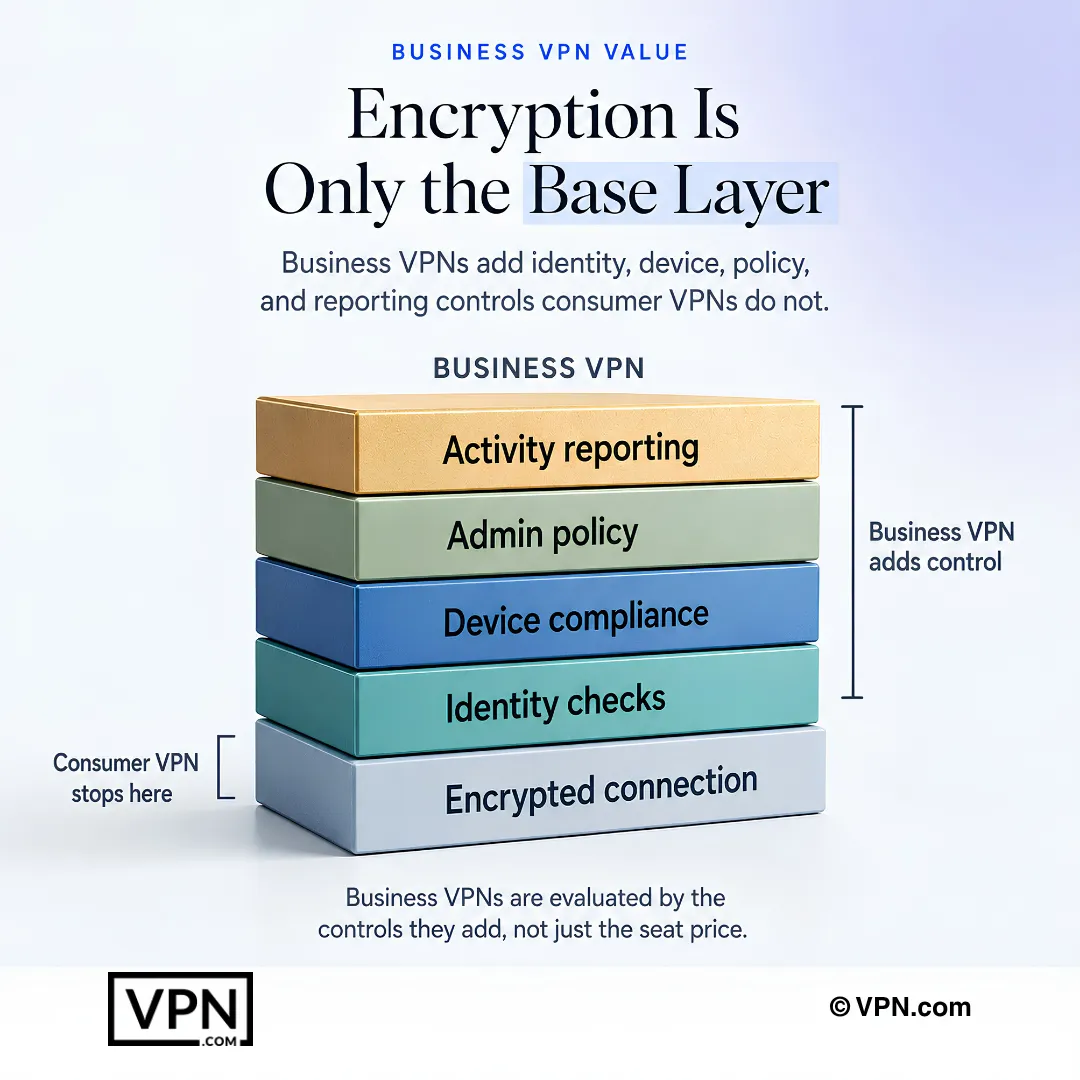
A business VPN supports multiple users under one account instead of a single login. It adds a centralized admin dashboard for managing devices and permissions, SSO and MFA authentication, and dedicated or static IP addresses so company traffic doesn’t get flagged by banks or cloud platforms. Compliance support for HIPAA, GDPR, and SOC 2 is also standard, none of which consumer VPNs offer.
Remote access VPN connects individual employees to the company network from anywhere, the most common type for distributed teams. Site-to-site VPN links entire office branches into one unified network and runs continuously with no employee action needed. ZTNA verifies every user and device before granting access to specific resources rather than the whole network; NordLayer ships ZTNA-aligned features like device posture checks and micro-segmentation inside its VPN platform.
Jurisdiction determines whether a government can legally compel a provider to hand over data. Five Eyes member countries carry that risk, so providers headquartered outside those alliances offer stronger protection. Proton VPN is Swiss-based with no data retention requirements and holds ISO 27001, SOC 2 Type II, GDPR, and HIPAA certifications, the deepest compliance stack in our business roundup.
It depends on your industry: HIPAA for healthcare, GDPR for European operations, and SOC 2 for financial data. NordLayer supports SOC 2, GDPR, and HIPAA, while Proton VPN adds ISO 27001 and SOC 2 Type II on top of those same three. Confirm the provider’s certifications match your specific regulatory exposure before signing a contract.
Split tunneling routes only business traffic through the encrypted VPN tunnel while personal traffic, like streaming or casual browsing, goes directly to the internet. This preserves bandwidth for sensitive company data and reduces latency on non-sensitive tasks since that traffic skips the VPN’s routing path entirely. It’s a feature IT admins should document explicitly in usage policy, not leave to employee discretion.
AES-256 encryption is the baseline standard, paired with modern protocols like WireGuard or OpenVPN. Avoid any provider still running PPTP or L2TP, both of which carry known vulnerabilities that put business data at risk. NordLayer uses AES-256 with the NordLynx (WireGuard-based) protocol, while Proton VPN and PIA both support WireGuard and OpenVPN across their business tiers.
Expect a range depending on provider. NordLayer’s NordLynx protocol showed about 5% download loss in testing, the strongest result, while Proton VPN stayed under 8% and PIA measured around 15%, the highest in the group. Surfshark’s downloads held at 8% but uploads dropped as much as 50%, worth noting if your team transfers large files. NordVPN, which powers NordLayer, ranks #1 of 22 in our Speed Lab.
Business VPNs bill per seat rather than per individual, with volume discounts typically kicking in at 25+ seats. Proton VPN’s business plans require a minimum of 5 seats. For comparison, the underlying consumer VPN plans these providers build on start from $2.20/month (PIA) to $3.49/month (NordVPN) and $3.26/month (ExpressVPN), though business per-seat rates are priced and billed separately.
Yes. NordLayer offers a 14-day free trial with no credit card required, letting IT test the admin dashboard before purchasing seats. NordVPN, ExpressVPN, ProtonVPN, and PIA all back their underlying consumer plans with 30-day money-back guarantees. PIA explicitly includes this guarantee on its business-suited plans, giving small teams a low-risk way to test before renewing.
It varies by provider and team size. NordLayer fits 10 to 500 users with centralized licensing, Proton VPN’s business infrastructure suits 25 to 200 users, and PIA targets 2 to 25 users but includes unlimited simultaneous device connections per account, which stretches further for very small teams without per-seat device caps.
Choose a provider based on team size and compliance needs, then purchase licenses (volume discounts typically start at 25+ seats). Configure the admin dashboard and enforce MFA; NordLayer and Proton VPN support SSO through Okta, Azure AD, and Google Workspace. Deploy to devices via MDM tools like Jamf or Intune, then verify connections with speed and DNS leak checks from at least two employee locations.
A working kill switch should cut internet access entirely rather than fall back to an unprotected connection, which is what forced-disconnect testing checks for. PIA’s kill switch performed reliably in drop tests during our evaluation. Beyond the technical fix, document clear usage policies covering what happens mid-drop, since a business VPN only protects data when every employee actually uses it consistently.
Free VPNs often monetize user data instead of charging directly, which is disqualifying for any organization handling client or employee information. They also typically run weaker encryption and lack the centralized admin dashboard, SSO, and device compliance checks that business use requires. None of the providers scored in our business rankings, NordLayer, Surfshark, Proton VPN, or PIA, offer a free business tier for this reason.