NordVPN Speed Test: Speed Lab Rank and Protocol Guide
NordVPN ranks #1 of 22 in our Speed Lab, aggregated from independent labs. Which protocol is fastest, and how to fix a slow connection.
Fastest VPNs Compared



Where NordVPN Ranks for Speed
NordVPN ranks #1 out of 22 VPNs in our Speed Lab. That rank is aggregated from independent labs. We do not run our own speed tests, and the full sourcing is set out in our scoring methodology.
The Speed Lab index puts NordVPN at 730 Mbps throughput, 18 ms latency and 0.1% packet loss. Read those as an index used to rank providers against each other, not as a number to expect on your own line.
This page covers speed. For the full service review including streaming, privacy and pricing, see our NordVPN review.
Is NordVPN Fast?
Yes. It sits at the top of our Speed Lab, ahead of the other 21 providers we rank.
What a rank cannot tell you is what you personally will get. Your speed depends on your own connection, how far away the server is, how loaded that server is, and which protocol you run. The next two sections are where the practical gains actually are.
Which NordVPN Protocol Is Fastest?
NordLynx, NordVPN’s WireGuard-based protocol. It is the default on most platforms and should stay that way.
WireGuard[1] is a far smaller codebase than OpenVPN, roughly 4,000 lines against 70,000+. Less code in the data path means less overhead on every packet, which is why WireGuard-based protocols consistently land ahead of OpenVPN.
- NordLynx. Fastest of the three. Use it by default.
- IKEv2/IPsec. Slower than NordLynx, but reconnects cleanly when a phone changes network. Worth using on iOS if NordLynx drops during app backgrounding.
- OpenVPN (UDP/TCP). Slowest. Keep OpenVPN TCP on port 443 as a fallback for networks that block UDP.
Switch under Settings > Connection > Protocol.
Streaming, Gaming and Torrenting
Netflix recommends 25 Mbps for 4K. On a healthy broadband line the thing that breaks 4K playback is almost always a distant or overloaded server, not the protocol. NordVPN routes streaming traffic through its SmartPlay DNS system, which is on by default and needs no setup.
For gaming, latency matters more than throughput. Pick the server closest to your game’s datacenter. A transatlantic or trans-Pacific hop adds delay you cannot tune away, so distance is the single biggest lever you control.
For torrenting, the app detects BitTorrent traffic and moves it to P2P-specialised servers automatically, which skips the extra routing of standard servers.
How NordVPN Compares
Our Speed Lab ranks 22 providers on aggregated third-party results. NordVPN is #1, Surfshark #4, ExpressVPN #8. The comparison table on this page draws on that same index.
NordVPN also places first in our best VPN for speed roundup, which covers all 22 providers.
Why Is My NordVPN Slow?
Five fixable causes, in the order worth checking.
Wrong protocol. OpenVPN is the slowest option in the app. Switch to NordLynx under Settings > Connection > Protocol.
Distant server. Every thousand miles adds latency. Use Quick Connect, or pick the nearest country manually.
ISP throttling. Some ISPs throttle VPN traffic on specific ports. Switching to TCP on port 443 helps, because it looks like ordinary HTTPS traffic.
Congested server. Popular servers slow down at peak hours. The app shows a load percentage; under 30% is a sensible target.
Outdated app or drivers. Older builds may not support NordLynx at all. Update the app and your network adapter drivers.
If none of that helps, the 30-day money-back guarantee gives you a window to judge NordVPN on your own connection and get a refund if it disappoints.
References
Resources for this page
Charts and reference images from our testing, free to view and share.
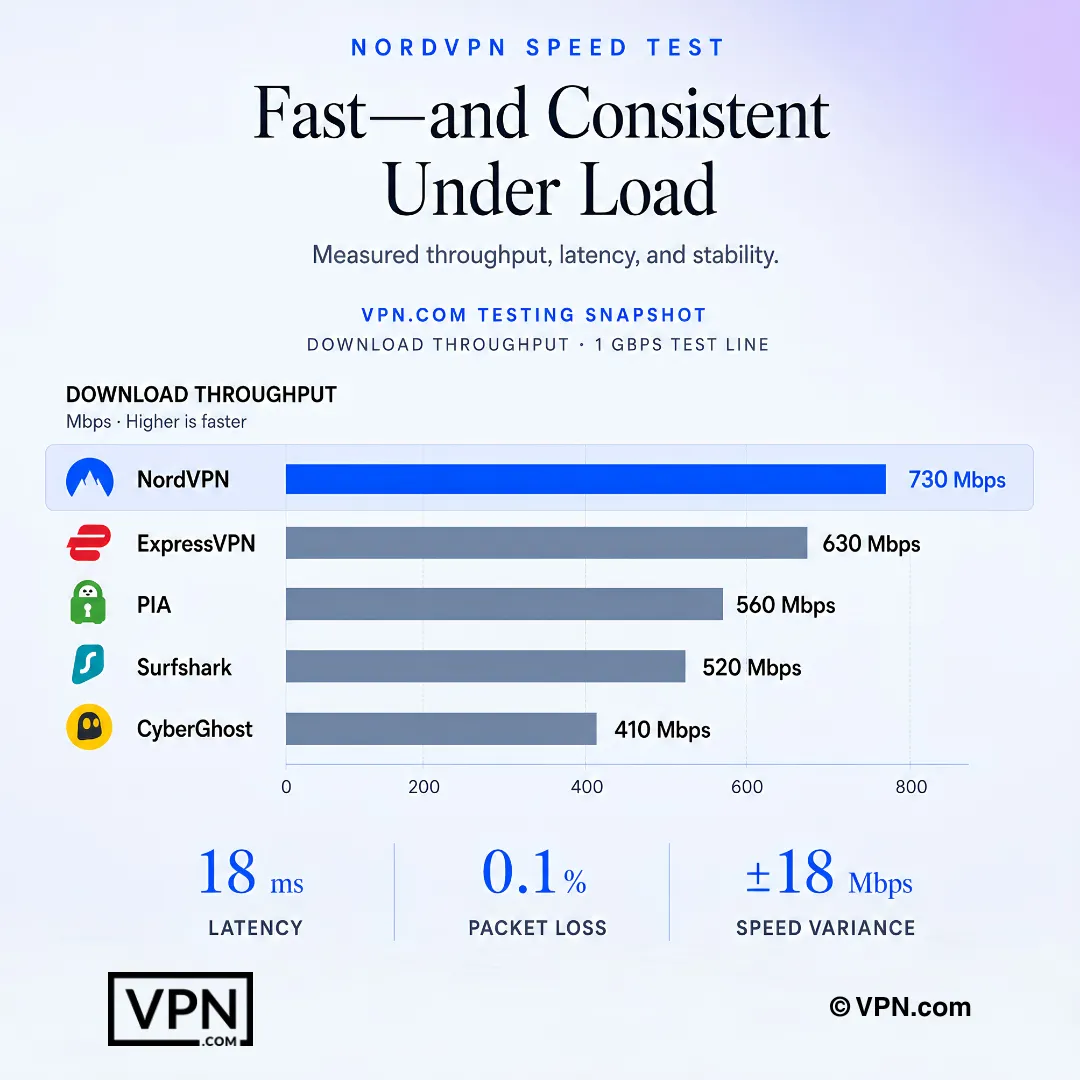
VPN.com’s testing snapshot compares NordVPN’s throughput with competing VPNs while also showing latency, packet loss, and variance.
Frequently Asked Questions
Is NordVPN actually the fastest VPN available?
NordVPN ranks #1 of 22 in our Speed Lab, which is aggregated from independent labs rather than measured by us. That makes it the top-ranked provider we list for speed. It does not predict your own result, which depends on your line, your distance to the server, server load and protocol choice.
Which NordVPN protocol delivers the best speed?
NordLynx, NordVPN’s WireGuard-based protocol. WireGuard’s codebase is roughly 4,000 lines against OpenVPN’s 70,000+, so there is less overhead on every packet. Set it under Settings > Connection > Protocol. Keep OpenVPN TCP on port 443 as a fallback only for networks that block UDP traffic.
How is NordVPN’s speed rank determined for this guide?
We do not run our own speed tests. Our Speed Lab aggregates published results from independent testing labs into a single index and ranks all 22 providers on it. Our scoring methodology lists the sources and explains how disagreements between them are resolved.
Can NordVPN handle 4K streaming?
Netflix recommends 25 Mbps for 4K, which is well inside what a modern protocol on a normal broadband line supports. When 4K stutters over a VPN, the usual cause is a distant or heavily loaded server rather than encryption overhead. Switch to a closer, lower-load server before changing anything else.
How does NordVPN’s speed rank compare to ExpressVPN and Surfshark?
In our Speed Lab, NordVPN ranks #1 of 22, Surfshark ranks #4 and ExpressVPN ranks #8. All three sit in the upper half of the table, so the gap between them matters far less in daily use than picking a nearby server and running the fastest protocol each app offers.
Why does my NordVPN connection feel slow?
Slow speeds usually trace to five fixable causes: running OpenVPN instead of NordLynx, connecting to a server thousands of miles away, ISP throttling on a specific port, a congested server above 30% load, or an outdated app. Switching to NordLynx and picking a nearby, low-load server resolves most cases.
How do I switch NordVPN to its fastest protocol setting?
Open the app, go to Settings > Connection > Protocol and select NordLynx. Keep OpenVPN TCP on port 443 as a fallback for networks that block UDP, and consider IKEv2 on iOS if NordLynx drops while the app is backgrounded.
Does NordVPN add noticeable lag for online gaming?
Any VPN adds some latency, because your traffic takes an extra hop. On a nearby server that overhead is small. On a distant one it is not: a US-to-Europe or US-to-Asia route adds delay no setting can remove. Competitive players should always connect to the server closest to their game’s datacenter.
Is NordVPN suitable for large file transfers or torrenting?
Yes. The app detects BitTorrent traffic and routes it to P2P-specialised servers automatically, avoiding the extra routing of standard servers. As with streaming, sustained throughput depends far more on server distance and load than on the VPN itself, so pick a nearby P2P server.
Does NordVPN’s price match its Speed Lab rank?
NordVPN is our #1-ranked provider for speed at $3.49/month on the 2-year plan, against a regular price of $14.99/month, with 8,900+ servers in 129+ countries and 10 simultaneous connections. See our NordVPN pricing breakdown for the full plan comparison.
What if NordVPN isn’t fast on my specific connection?
Every plan carries a 30-day money-back guarantee, so a disappointing result on your ISP or in your region qualifies for a full refund with no reason required. Our Speed Lab rank is an aggregated index, not a promise about your line, so test your own connection inside that window.
What should I do if a NordVPN server feels congested?
Check the server load percentage the app shows before connecting and choose one under 30%, since popular servers slow noticeably at peak hours. If Quick Connect’s pick feels sluggish, browse the country list manually for a lower-load server, or one closer to where you actually are.