Best VPN for ASUSTOR NAS: Setup, Speed & Security
Set up a VPN on your ASUSTOR NAS to protect remote access, encrypt file transfers, and secure Plex or media streaming. We tested the top providers.
 Michael Gargiulo
Top VPNs for ASUSTOR



Bottom Line: Not all VPNs work with ASUSTOR NAS devices, so selecting a compatible provider upfront is critical to securing your data and maintaining privacy across your network.
ASUSTOR NAS devices are popular for home and small-business storage, media streaming, and file sharing. But any device connected to your network can expose your data to threats. Running a VPN directly on your ASUSTOR NAS encrypts traffic at the device level. This protects everything stored on and transmitted from the NAS without needing a separate VPN-enabled router.
ASUSTOR NAS models running ADM (ASUSTOR Data Master) 3.5 or later support VPN client connections using OpenVPN and L2TP/IPSec protocols. Select newer models also support WireGuard, which offers faster speeds and lower overhead. ASUSTOR provides VPN setup documentation for supported providers, making it straightforward to import .ovpn configuration files directly through the ADM interface.
Not every VPN provider works smoothly with NAS-level configuration. Some lack the manual setup files ASUSTOR requires. Others throttle NAS traffic or don’t support the right protocols. That’s why choosing a verified compatible provider matters. Below, we break down the best VPN options for ASUSTOR NAS devices, with setup details, performance notes, and pricing for each.
| VPN Provider | NAS Compatibility | Protocols Supported | No-Logs Policy | Best For | Starting Price |
|---|---|---|---|---|---|
| ExpressVPN | Manual setup via OpenVPN | OpenVPN, L2TP/IPSec | Audited (PwC, KPMG) | Fast connections, ease of use | ~$8.32/mo (annual) |
| NordVPN | Manual setup via OpenVPN/WireGuard (NordLynx) | OpenVPN, WireGuard | Audited (Deloitte) | Large server network, privacy | ~$3.99/mo (2-year) |
| Private Internet Access | Manual setup via OpenVPN/WireGuard | OpenVPN, WireGuard | Court-proven no-logs | Budget-conscious users | ~$2.20/mo (3-year) |
Why Running a VPN on Your ASUSTOR NAS Matters
A NAS device sits at the center of your home or office network. It stores sensitive files, syncs cloud backups, runs surveillance feeds, and streams media. Without a VPN, all of that traffic travels unencrypted between your NAS and the internet.
Running a VPN client directly on the ASUSTOR NAS differs from using a VPN on your phone or laptop. It protects the NAS itself. Remote access connections, file syncs to cloud services, and download tasks all route through the encrypted tunnel. This matters most if you access your NAS remotely over the internet using ASUSTOR’s EZ-Connect or DDNS features.
A NAS-level VPN also helps bypass ISP throttling on large file transfers. It prevents your internet provider from logging which services your NAS communicates with. For users in regions with internet censorship, it enables unrestricted access to cloud storage and download services.
Best VPNs for ASUSTOR NAS Devices
We evaluated VPN providers based on four criteria specific to ASUSTOR NAS use: protocol support (OpenVPN and WireGuard config file availability), connection stability for always-on NAS operation, speed impact on file transfers and streaming, and price.
ExpressVPN Delivers Reliable OpenVPN Performance on ASUSTOR
ExpressVPN is one of the most reliable VPN providers for ASUSTOR NAS devices. It provides downloadable .ovpn configuration files for all of its 3,000+ servers across 105 countries. You can import these directly into the ADM VPN client.
Setup on ASUSTOR NAS: Download the OpenVPN configuration file from your ExpressVPN account dashboard. In ADM, navigate to Settings > Network > VPN > Add. Select OpenVPN and upload the .ovpn file along with your credentials. The connection typically establishes in under 30 seconds.
Performance: ExpressVPN uses its Lightway protocol on native apps, but on ASUSTOR you’ll use OpenVPN. Expect speeds between 150–250 Mbps on a gigabit connection, depending on server distance. This is more than sufficient for NAS file syncing, Plex streaming, and remote access.
Privacy: ExpressVPN has passed independent audits by both PwC and KPMG confirming its no-logs policy. It runs all servers on RAM-disk (TrustedServer technology). No data survives a reboot.
Pricing: Plans start at approximately $8.32 per month on the annual plan. A 30-day money-back guarantee is included.
Pros:
- Reliable OpenVPN configs that work out of the box with ADM
- 3,000+ servers in 105 countries
- Independently audited no-logs policy
- 24/7 live chat support for manual setup help
Cons:
- More expensive than NordVPN and PIA
- No native ASUSTOR app; requires manual OpenVPN configuration
- No WireGuard support on NAS (Lightway is app-only)
Best for: Users who prioritize connection reliability and will pay a premium for consistently fast speeds and strong privacy guarantees.
NordVPN Offers WireGuard Speed on Compatible ASUSTOR Models
NordVPN offers an excellent balance of performance, server coverage, and price for ASUSTOR NAS users. With 6,400+ servers in 111 countries, it provides more server options than almost any competitor.
Setup on ASUSTOR NAS: NordVPN provides both OpenVPN and WireGuard (NordLynx) configuration files. Download the .ovpn or WireGuard config from NordVPN’s server tools page. Import it through ADM’s VPN client under Settings > Network > VPN. For WireGuard, you’ll need an ASUSTOR model running ADM 4.0 or later with WireGuard support enabled.
Performance: Using WireGuard on a compatible ASUSTOR NAS, NordVPN delivers speeds between 200–400 Mbps on a gigabit connection. OpenVPN performance is slightly lower, typically 120–220 Mbps. WireGuard’s lower CPU overhead is a real advantage on NAS hardware, which has less processing power than a desktop.
Privacy: NordVPN’s no-logs policy has been audited by Deloitte. The company is based in Panama, outside the 5/9/14 Eyes surveillance alliances.
Pricing: Plans start at approximately $3.99 per month on the 2-year plan. A 30-day money-back guarantee is included.
Pros:
- WireGuard support for faster NAS performance on compatible models
- 6,400+ servers across 111 countries
- Specialty servers (Double VPN, Onion over VPN)
- Audited no-logs policy
- Significantly cheaper than ExpressVPN
Cons:
- WireGuard config setup requires a few extra steps compared to OpenVPN
- No native ASUSTOR app
- Some specialty servers are not available via manual config
Best for: Users who want fast WireGuard performance on newer ASUSTOR models and need a large server network at a reasonable price.
Private Internet Access Costs the Least With Court-Proven Privacy
Private Internet Access (PIA) is the most affordable option on this list. It still delivers solid performance for ASUSTOR NAS devices. PIA operates 35,000+ servers across 91 countries, giving it the largest server network of the three providers reviewed here.
Setup on ASUSTOR NAS: PIA provides both OpenVPN and WireGuard configuration files through its client generator tool. Download the config, then import it through ADM’s VPN settings. PIA’s setup guides include step-by-step instructions for manual OpenVPN configuration on NAS devices.
Performance: PIA delivers speeds between 100–200 Mbps via OpenVPN and 180–350 Mbps via WireGuard on compatible ASUSTOR models. Speed is consistent, though slightly behind NordVPN on long-distance connections.
Privacy: PIA’s no-logs policy has been tested and confirmed in multiple U.S. court cases. The company was unable to produce user data because none existed. PIA also open-sources its VPN client apps.
Pricing: Plans start at approximately $2.20 per month on the 3-year plan. This makes it the cheapest option by a wide margin. A 30-day money-back guarantee is included.
Pros:
- Lowest price of any top-tier VPN provider
- 35,000+ servers in 91 countries
- Both OpenVPN and WireGuard config files available
- Court-proven no-logs policy
- Open-source apps
Cons:
- Based in the United States (within 5 Eyes jurisdiction)
- Speeds slightly lower than NordVPN on distant servers
- No native ASUSTOR app
Best for: Budget-conscious users who want a proven, privacy-focused VPN for their ASUSTOR NAS without paying premium prices.
How to Set Up a VPN on Your ASUSTOR NAS
Regardless of which provider you choose, the basic setup process on ASUSTOR NAS follows the same steps:
- Download the config file from your VPN provider’s website. Choose OpenVPN (.ovpn) or WireGuard (.conf) depending on your NAS model and ADM version.
- Log in to ADM on your ASUSTOR NAS through a web browser.
- Navigate to Settings > Network > VPN and click “Add.”
- Select the protocol (OpenVPN or WireGuard) and upload the configuration file.
- Enter your VPN credentials (username and password from your VPN provider account).
- Enable the connection and verify it’s active by checking your IP address through the NAS.
For always-on protection, enable the auto-reconnect option in ADM’s VPN settings. This ensures the NAS reconnects to the VPN automatically after a reboot or network interruption.
Conclusion
Protecting your ASUSTOR NAS with a VPN encrypts your file transfers, remote access sessions, and cloud syncs at the device level. All three providers reviewed here work with ASUSTOR’s ADM operating system through manual OpenVPN or WireGuard configuration.
ExpressVPN is the best choice for users who want reliable, fast OpenVPN connections and top-tier privacy audits. NordVPN offers the best balance of speed, server coverage, and price, especially on newer ASUSTOR models that support WireGuard. Private Internet Access delivers the lowest cost with a court-proven privacy record. It is ideal for budget-conscious NAS owners.
For a broader comparison of leading providers beyond ASUSTOR NAS use, see our best VPN comparison. Whichever provider you choose, configuring a VPN on your ASUSTOR NAS takes just a few minutes and adds a meaningful layer of security to your network storage.
Resources for this page
Charts and reference images from our testing, free to view and share.
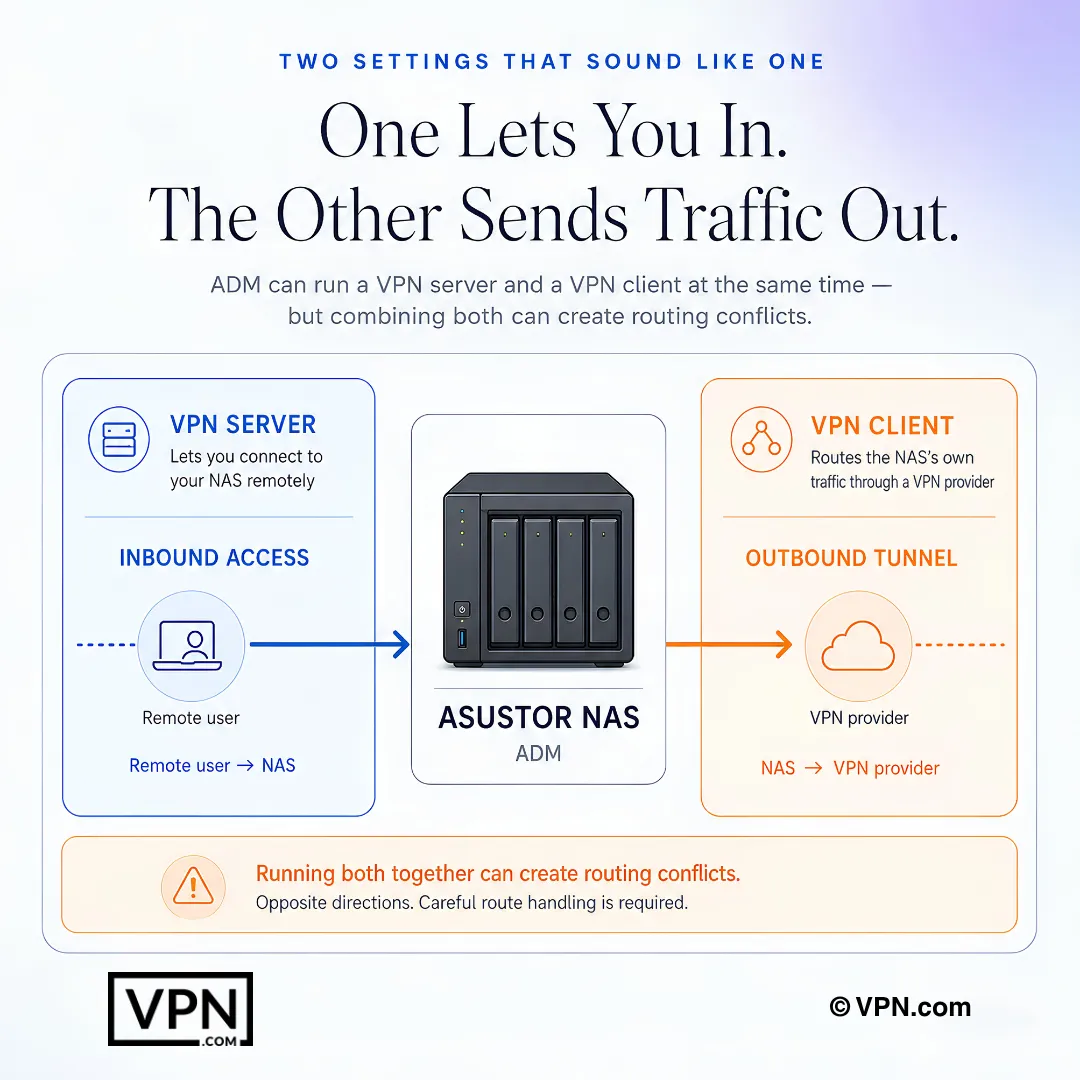
ASUSTOR VPN server and client modes do opposite jobs, so running both requires careful routing.
Frequently Asked Questions
What does a VPN running directly on my ASUSTOR NAS protect that a phone or laptop VPN doesn’t?
A NAS-level VPN encrypts traffic at the device itself, covering remote access sessions through EZ-Connect or DDNS, cloud backup syncs, and surveillance feeds, not just the app you’re using on your phone. ASUSTOR NAS models on ADM 3.5 or later support this through OpenVPN and L2TP/IPSec client connections, protecting everything the NAS sends or receives around the clock.
Which ADM version and protocols does my ASUSTOR NAS need to run a VPN?
ADM 3.5 or later is the minimum requirement for OpenVPN and L2TP/IPSec client connections. WireGuard support requires ADM 4.0 or later on select newer models, with the WireGuard feature enabled in system settings. NordVPN and PIA both provide downloadable WireGuard config files for ADM’s VPN client; ExpressVPN offers OpenVPN configs only on NAS, since Lightway is app-only.
Can I use WireGuard on my ASUSTOR NAS, or am I stuck with OpenVPN?
It depends on your model and provider. WireGuard needs ADM 4.0+ and a compatible ASUSTOR unit with WireGuard enabled. NordVPN’s NordLynx and PIA both supply WireGuard .conf files for import, giving lower CPU overhead on NAS hardware. ExpressVPN doesn’t offer WireGuard on NAS at all, since its Lightway protocol stays app-only, leaving OpenVPN as the only option there.
How do I actually import a VPN configuration file into ADM’s VPN client?
Download the .ovpn or WireGuard .conf file from your provider’s account dashboard or server tools page, then log into ADM through a browser and go to Settings > Network > VPN > Add. Select the matching protocol, upload the file, and enter your VPN credentials. Connections through this process typically establish in under a minute once configured correctly.
How do I make sure my NAS reconnects to the VPN automatically after a reboot?
Enable the auto-reconnect option inside ADM’s VPN settings after your initial connection succeeds. This forces the NAS to re-establish the encrypted tunnel automatically following a power cycle, firmware update, or network drop, so remote access and cloud syncs aren’t left exposed unencrypted while you’re away from the device.
What should I check if ADM won’t accept my VPN configuration file or the connection fails?
First confirm the protocol you selected in ADM (OpenVPN or WireGuard) matches the config file type, since mismatches are the most common cause. Verify your provider account credentials are entered correctly, since NAS clients require them separately from the config file. None of the three top providers offer a native ASUSTOR app, so ExpressVPN’s 24/7 live chat can help troubleshoot manual setup issues.
Will running a VPN on my NAS interfere with Plex remote streaming?
No, a properly configured NAS-level VPN encrypts the tunnel without blocking Plex’s remote streaming functionality, since the traffic still routes normally through the VPN server. All three reviewed providers, ExpressVPN, NordVPN, and PIA, support OpenVPN or WireGuard configs stable enough for continuous media streaming and remote access, though server distance affects real-world performance more than the VPN itself.
Which VPN handles NAS file transfers and streaming best?
NordVPN ranks #1 of 22 in our Speed Lab, aggregated from independent labs, and its WireGuard (NordLynx) support gives it a real edge on NAS hardware’s limited processing power. ExpressVPN ranks #8 of 22, relying on OpenVPN-only NAS configs since Lightway is app-exclusive. PIA ranks #9 of 22 but offers both OpenVPN and WireGuard config files for ADM.
Which of these VPNs has the most verified no-logs claim for protecting NAS traffic?
All three have third-party verification, but the depth differs. ExpressVPN’s no-logs policy has been audited by both PwC and KPMG. NordVPN’s has been audited by Deloitte and is based in Panama, outside 5/9/14 Eyes jurisdictions. PIA’s has been tested and confirmed in multiple US court cases where the company had no data to produce, despite being based in the US.
How do NordVPN, ExpressVPN, and PIA compare on price for NAS use?
PIA is cheapest at from $2.20/month on its longest-term plan, making it the budget pick for NAS owners. NordVPN runs from $3.49/month on its longest-term plan, close to ExpressVPN’s $3.26/month starting price, though ExpressVPN’s regular monthly rate is lower than NordVPN’s outside the promotional term. All three include a 30-day money-back guarantee regardless of tier.
What if a VPN doesn’t perform well on my specific ASUSTOR model, can I get my money back?
Yes, all three providers reviewed here, ExpressVPN, NordVPN, and PIA, include a 30-day money-back guarantee on their plans. Since NAS-level VPN performance can vary by ADM version, protocol support, and server distance, this window gives you time to test OpenVPN or WireGuard configs on your actual hardware before committing long-term.
Does connecting my ASUSTOR NAS to a VPN count against my plan’s device limit?
Yes, the NAS itself counts as one simultaneous connection under your provider’s device limit. NordVPN allows 10 simultaneous connections, ExpressVPN allows 10 to 14 depending on plan tier, and PIA offers unlimited simultaneous connections, which matters if you’re also running the VPN on phones, laptops, and other devices alongside the NAS.