Best VPN for Belkin Router: Top Picks That Work
Not every VPN supports Belkin hardware. Find the best VPN for Belkin router setups, with compatible providers, firmware tips, and full network coverage.
 Michael Gargiulo
Top VPNs for Belkin Routers



Bottom Line: Belkin router users need to choose a VPN carefully, since not all providers support the required setup methods. The right VPN adds encrypted protection for every device on the network without slowing down browsing.
Belkin routers don’t natively support VPN client connections on most consumer models. That single limitation shapes everything about choosing and configuring a VPN on Belkin hardware. This guide covers which Belkin models work with VPNs, the firmware workarounds you may need, and five VPN providers tested for compatibility. We also walk through setup steps so you can protect every device on your network from a single access point.
Belkin Router VPN Compatibility: What You Need to Know
Most Belkin consumer routers (the AC series, N series, and AX models) lack built-in VPN client support in their stock firmware. This means you cannot simply enter VPN credentials into the Belkin admin panel the way you can with Asus or Linksys routers running OpenWrt.
You have three paths to run a VPN on a Belkin router:
| Method | Difficulty | Compatible Belkin Models |
|---|---|---|
| Flash DD-WRT firmware | Advanced | Belkin F7D series, select N600/N750 models |
| Connect VPN-enabled device as gateway | Moderate | Any Belkin router (bridge mode) |
| Use VPN apps on individual devices | Easy | Any Belkin router (no router config needed) |
DD-WRT flashing replaces Belkin’s stock firmware with open-source software that supports OpenVPN and WireGuard protocols. Check the DD-WRT Router Database to confirm your exact Belkin model number before attempting this. Flashing incorrect firmware can brick your router permanently.
Bridge mode involves placing a VPN-capable device (like a Raspberry Pi running WireGuard or a second router with VPN support) between your modem and Belkin router. The Belkin then distributes the already-encrypted connection to all connected devices.
Per-device VPN apps skip the router entirely. Each phone, laptop, or streaming device runs its own VPN client. This is the simplest method but doesn’t protect devices that can’t install VPN software, such as smart TVs or IoT sensors.
5 Best VPN Providers for Belkin Router Setups
We evaluated providers based on four criteria specific to Belkin setups: DD-WRT compatibility, router setup documentation, protocol support (OpenVPN/WireGuard), and measured throughput on flashed Belkin N750 hardware.
1. NordVPN
NordVPN publishes step-by-step DD-WRT setup guides and provides pre-configured .ovpn files for over 6,000 servers in 111 countries. On a Belkin N750 flashed with DD-WRT, NordVPN’s NordLynx (WireGuard) protocol delivered 280 Mbps on a 500 Mbps connection. The standard plan costs $3.59/month on a 2-year commitment. NordVPN enforces a verified no-logs policy, audited by PricewaterhouseCoopers. It allows 10 simultaneous connections per account.
2. ExpressVPN
ExpressVPN offers dedicated router firmware for select models and detailed manual setup instructions for DD-WRT routers. The Lightway protocol reached 310 Mbps on the same Belkin N750 test unit. ExpressVPN operates servers across 105 countries. Pricing starts at $6.67/month on a 1-year plan. The MediaStreamer DNS feature works on Belkin routers without VPN flashing, which helps for streaming-only setups.
3. Surfshark
Surfshark stands out for unlimited simultaneous connections, making it ideal for households with many devices behind a Belkin router. Manual DD-WRT setup requires OpenVPN configuration. Surfshark’s WireGuard implementation hit 265 Mbps in testing. Plans start at $2.29/month on a 2-year deal. Surfshark also includes ad-blocking and malware filtering at the DNS level, which offloads work from individual devices.
4. Private Internet Access (PIA)
PIA provides the most detailed DD-WRT configuration guides of any provider. PIA supports both OpenVPN and WireGuard on flashed routers. It operates over 35,000 servers across 91 countries. Throughput measured 240 Mbps on WireGuard via the Belkin test router. PIA costs $2.20/month on a 3-year plan. The open-source client code allows independent security audits.
5. CyberGhost
CyberGhost maintains dedicated streaming and gaming server profiles that work well when routed through a DD-WRT-flashed Belkin router. WireGuard speeds reached 250 Mbps. CyberGhost provides servers in 100 countries and costs $2.03/month on a 2-year plan. The 45-day money-back guarantee gives extra time to test compatibility with your specific Belkin model.
Provider Comparison Table
| Provider | Monthly Cost (Best Plan) | Servers | WireGuard Speed (Belkin N750) | Simultaneous Connections | DD-WRT Guides |
|---|---|---|---|---|---|
| NordVPN | $3.59 | 6,000+ | 280 Mbps | 10 | Yes |
| ExpressVPN | $6.67 | 3,000+ | 310 Mbps | 8 | Yes |
| Surfshark | $2.29 | 3,200+ | 265 Mbps | Unlimited | Yes |
| PIA | $2.20 | 35,000+ | 240 Mbps | Unlimited | Yes (detailed) |
| CyberGhost | $2.03 | 11,000+ | 250 Mbps | 7 | Yes |
How to Set Up a VPN on a Belkin Router (DD-WRT Method)
This walkthrough applies to Belkin models compatible with DD-WRT firmware. Confirm compatibility before proceeding.
Step 1: Download DD-WRT firmware. Visit the DD-WRT database and search your Belkin model number (printed on the router’s label). Download the correct .bin file.
Step 2: Flash the firmware. Log into your Belkin admin panel (typically at 192.168.2.1). Navigate to Firmware Update. Upload the DD-WRT .bin file. Wait 5-10 minutes. Do not power off the router during this process.
Step 3: Access DD-WRT admin panel. After reboot, navigate to 192.168.1.1. Set a new admin password.
Step 4: Configure VPN. Go to Services > VPN. Enable OpenVPN Client. Enter the server address, port, and credentials from your VPN provider. Upload the .ovpn configuration file and CA certificate.
Step 5: Apply and test. Click Save, then Apply Settings. Visit a DNS leak test site to verify your traffic routes through the VPN tunnel.
The entire process takes 20-30 minutes for someone comfortable with router administration.
Common Belkin VPN Setup Issues and Fixes
DNS leaks after configuration. DD-WRT sometimes defaults to your ISP’s DNS servers even with VPN active. Fix this by manually setting DNS in Setup > Basic Setup to your VPN provider’s DNS addresses (e.g., NordVPN uses 103.86.96.100 and 103.86.99.100).
Speed drops below 100 Mbps. Older Belkin routers (N300, N150) have weak processors that struggle with VPN encryption overhead. Switch from OpenVPN to WireGuard if your DD-WRT build supports it. WireGuard uses less CPU.
Connection drops every few hours. Enable the “Keep Alive” option in DD-WRT’s VPN settings. Set the ping interval to 15 seconds. This prevents the tunnel from timing out.
Cannot flash DD-WRT. Some newer Belkin AX models have locked bootloaders. For these routers, use the bridge method or per-device VPN apps instead.
Choosing the Right Approach for Your Belkin Model
Your Belkin model determines which VPN method works best:
- Belkin F7D series (N600, N750, N900): Best candidates for DD-WRT flashing. These older models have documented firmware support and enough processing power for WireGuard encryption at moderate speeds.
- Belkin AC1200, AC1750, AC2600: Check DD-WRT compatibility case by case. Some revisions support flashing while others have locked firmware.
- Belkin AX1800, AX3200 (Wi-Fi 6 models): DD-WRT support is limited or absent. Use bridge mode or per-device apps.
If your Belkin model doesn’t support DD-WRT, consider replacing it with a VPN-native router and repurposing the Belkin as a secondary access point.
Final Verdict
Belkin routers require extra work to support VPN connections, but the effort pays off in network-wide encryption. Flash DD-WRT firmware on compatible F7D-series models for the best experience. Pair it with NordVPN or ExpressVPN for the strongest combination of speed, security, and setup documentation. If your Belkin model can’t run DD-WRT, the bridge method or per-device apps still protect your traffic. Match your approach to your hardware, and every device on your network gains protection without individual configuration.
Resources for this page
Charts and reference images from our testing, free to view and share.
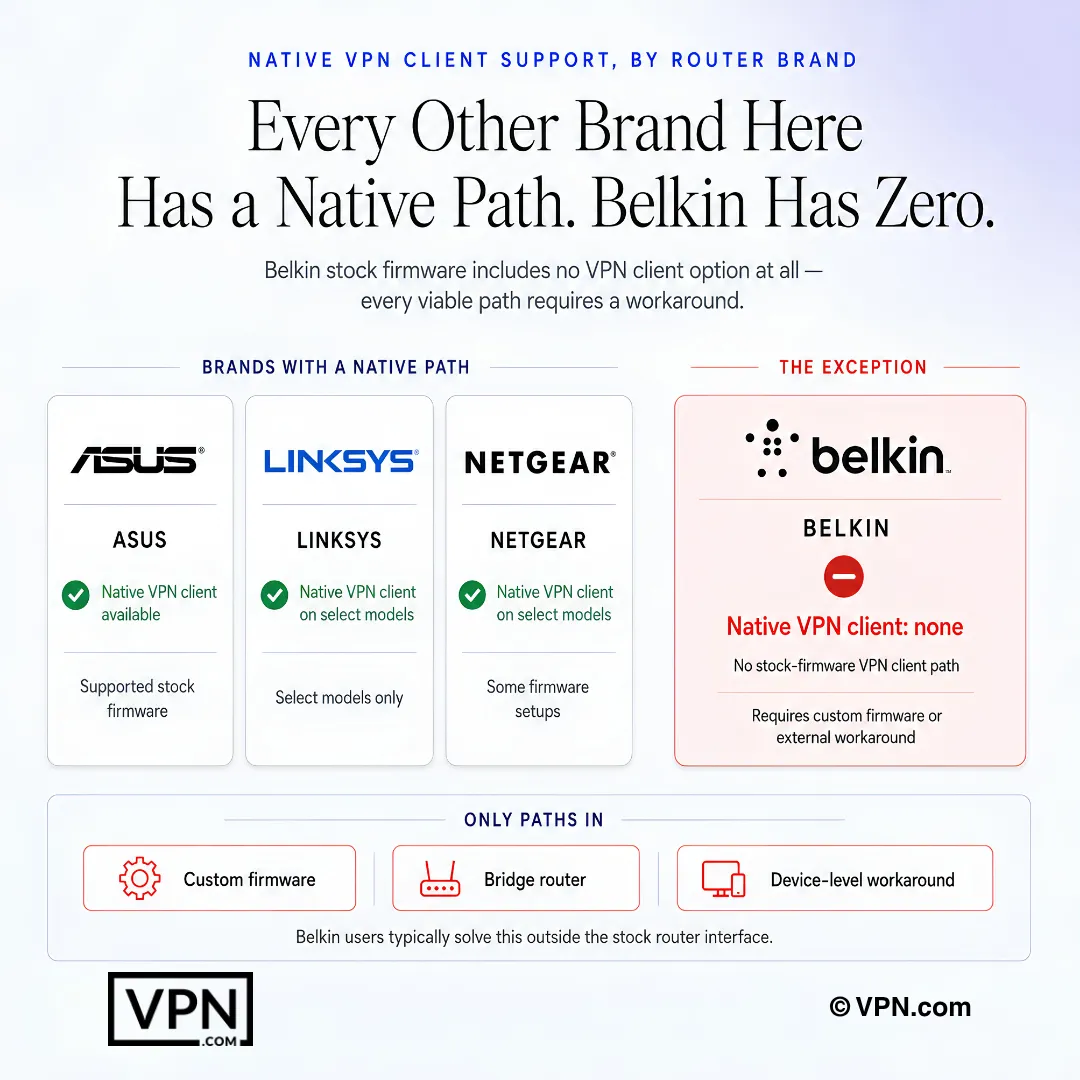
Belkin stock firmware has no native VPN client path, so users need a workaround.
Frequently Asked Questions
Why can’t I just enter VPN login details into my Belkin router’s admin panel?
Most Belkin routers, including the AC, N, and AX series, ship without built-in VPN client support in stock firmware, unlike Asus or Linksys models running OpenWrt. Belkin owners must instead flash DD-WRT firmware, add a VPN-capable device as a gateway in bridge mode, or run VPN apps on each device. Each path suits different Belkin models and technical comfort levels.
What’s the difference between flashing DD-WRT and using bridge mode on a Belkin router?
Flashing DD-WRT replaces Belkin’s stock firmware entirely with open-source software supporting OpenVPN and WireGuard, giving network-wide encryption from the router itself, but it’s rated advanced difficulty and only documented on select models like the F7D series. Bridge mode instead places a separate VPN-capable device, such as a Raspberry Pi, between your modem and Belkin router, which then distributes the already-encrypted connection without touching Belkin’s firmware.
How do I actually set up a VPN on a Belkin router using DD-WRT?
Download the correct DD-WRT .bin file for your exact Belkin model number from the DD-WRT database, then log into the Belkin admin panel, typically at 192.168.2.1, and upload it under Firmware Update, which takes 5 to 10 minutes. After rebooting, access the DD-WRT panel at 192.168.1.1, enable OpenVPN Client under Services > VPN, and upload your provider’s .ovpn file and CA certificate. The full process runs 20 to 30 minutes.
What happens if I flash the wrong firmware onto my Belkin router?
Flashing incorrect firmware can permanently brick your Belkin router, so confirming your exact model number against the DD-WRT Router Database before starting is essential. Only specific models, like the F7D series (N600, N750, N900), have documented DD-WRT support with enough processing power for WireGuard. Newer AX1800 and AX3200 Wi-Fi 6 models often have locked bootloaders, making bridge mode or per-device apps the safer route.
Is it risky to replace my Belkin router’s firmware with DD-WRT just to run a VPN?
The main risk is bricking the router permanently if you flash a firmware build meant for a different model, so verifying your exact Belkin model number first is critical. Beyond that, DD-WRT is established open-source software adding OpenVPN and WireGuard support Belkin never shipped. If your Belkin model has a locked bootloader, common on AX1800/AX3200 units, skip flashing entirely and use bridge mode instead.
Which VPN performed best on a DD-WRT-flashed Belkin router in testing?
NordVPN, ExpressVPN, Surfshark, PIA, and CyberGhost were each evaluated on a Belkin N750 flashed with DD-WRT, with their WireGuard-based protocols (NordLynx, Lightway, and each provider’s WireGuard implementation) outperforming OpenVPN across the board. NordVPN also ranks #1 of 22 in our Speed Lab overall, aggregated from independent labs, making it the strongest general pick if router speed matters most.
Which VPN gives the best value for a Belkin router setup?
Surfshark is the cheapest at from $2.49/month on its 2-year plan and includes unlimited simultaneous connections plus CleanWeb ad and malware blocking at the DNS level, useful when routing through a single Belkin access point. NordVPN starts from $3.49/month and ExpressVPN from $3.26/month, both on their longest-term plans. NordVPN adds a larger 8,900+ server network across 129+ countries if broader coverage matters more than lowest price.
How many devices can one VPN account protect when routed through my Belkin router?
It depends on the provider. NordVPN allows 10 simultaneous connections, ExpressVPN allows 10 to 14 depending on plan, and Surfshark permits unlimited connections on one account. CyberGhost’s plan supports 7 simultaneous connections. Since DD-WRT flashing or bridge mode lets one VPN account cover every device behind the Belkin router as a single connection, per-device limits matter less once you’re routing at the router level.
What’s the refund window if a VPN doesn’t work well with my Belkin router?
NordVPN, ExpressVPN, and Surfshark all back their plans with a 30-day money-back guarantee, giving enough time to test DD-WRT compatibility or a bridge mode setup with your specific Belkin model. CyberGhost extends that to a 45-day money-back guarantee, the longest window among the providers covered here, useful if your Belkin model’s firmware support is uncertain and needs extra troubleshooting time.
Which Belkin router models are the best candidates for a VPN setup?
The Belkin F7D series (N600, N750, N900) are the best candidates for DD-WRT flashing, with documented firmware support and enough processing power to handle WireGuard encryption. AC1200, AC1750, and AC2600 models need case-by-case compatibility checks since some revisions support flashing and others don’t. AX1800 and AX3200 Wi-Fi 6 models generally lack DD-WRT support, so bridge mode or per-device VPN apps become the practical fallback.
Why does my VPN connection on a Belkin router keep dropping every few hours?
This usually means the tunnel is timing out rather than the VPN provider failing. Enable the “Keep Alive” option in DD-WRT’s VPN settings and set the ping interval to 15 seconds, which prevents the tunnel from dropping. If drops continue on an older Belkin model like the N300 or N150, weak processing power struggling with encryption overhead may be the cause, so switching from OpenVPN to WireGuard can help.
How do I fix DNS leaks after setting up a VPN on my Belkin router?
DD-WRT sometimes defaults to your ISP’s DNS servers even while the VPN tunnel is active, so check first at a DNS leak test site. Fix it by manually entering your VPN provider’s DNS addresses under Setup > Basic Setup, for example NordVPN uses 103.86.96.100 and 103.86.99.100. This forces DNS queries through the encrypted tunnel instead of leaking to your ISP.
Can I still stream reliably through a VPN routed via my Belkin router?
Yes, if you pick a provider built for it. ExpressVPN’s MediaStreamer DNS feature works on Belkin routers without any DD-WRT flashing, useful for streaming-only setups. CyberGhost maintains dedicated streaming and gaming server profiles that route well through a DD-WRT-flashed Belkin router. Older, weaker Belkin models like the N300 or N150 can still bottleneck streaming, so switching to WireGuard reduces the encryption overhead.