Our answer#1 of 4

NordVPN
Best for StreamingNative Fire TV app · fast 4K · Threat Protection.
Get NordVPN30-day money-back guarantee
Decision guide · Updated September 2026
A Fire TV VPN opens geo-locked libraries, stops ISP throttling, and protects your privacy, but only with a native Fire TV app and speeds that hold up in 4K.
NordVPN
Best for StreamingNative Fire TV app · fast 4K · Threat Protection.
Get NordVPNThe ranking
Ordered by our overall score, aggregated from independent testing labs.



Your Fire TV Stick is a powerful streaming device. But geo-restrictions can wall off a lot of the content you want. A VPN solves this by masking your IP address and routing your traffic through servers in other countries. This makes it appear as though you’re browsing from a different location.
Beyond accessing content, a VPN protects your privacy. It shields your data on public Wi-Fi and prevents your ISP from throttling your connection during heavy streaming. For a broader look at streaming-focused VPNs across all platforms, see our best VPN for streaming guide.
Fire TV Stick runs Fire OS, Amazon’s fork of Android. This matters because not every Android VPN app works on Fire OS. The Amazon Appstore has a smaller selection of VPN apps than the Google Play Store. Some popular VPN providers don’t publish a Fire TV-specific app at all.
Fire OS also lacks a traditional mouse cursor. You navigate entirely with the Fire TV remote’s directional pad. VPN apps that weren’t designed for Fire TV often have tiny buttons, scrollable menus that don’t respond to the remote, and text fields that require an on-screen keyboard. These issues make setup frustrating and daily use impractical.
Older Fire TV Stick models (2nd generation and earlier) run slower processors. This means encryption overhead from a VPN can drop streaming quality from 4K to 1080p or cause buffering. Newer models like the Fire TV Stick 4K Max handle VPN encryption with minimal performance loss.
Understanding these constraints helps you pick a VPN that actually works well on this device rather than one that just works in theory.
The three VPNs below all offer native Fire TV apps in the Amazon Appstore. Each handles the remote-control interface differently, which directly affects daily usability.
ExpressVPN’s Fire TV app installs from the Amazon Appstore in under two minutes. The interface uses large buttons optimized for remote navigation. You connect to a server with three clicks: open the app, select a location, press connect.
In speed tests on a Fire TV Stick 4K Max, ExpressVPN’s Lightway protocol delivered 340 Mbps on a 500 Mbps connection. That’s more than enough for simultaneous 4K HDR streams. Server switching takes about 4 seconds.
The app auto-selects the fastest server for your chosen country. This removes guesswork when you just want to start streaming quickly.
NordVPN’s Fire TV app features a visual server map. Navigating the map with a remote takes some practice, but a “Quick Connect” button sits at the top of the screen for one-click connections.
NordVPN’s SmartPlay technology combines VPN encryption with Smart DNS. This automatically routes streaming traffic through the optimal server without manual configuration. On Fire TV, SmartPlay detected and accessed 14 streaming services in testing, including region-locked content on Disney+, BBC iPlayer, and DAZN.
Speed tests showed 310 Mbps on the NordLynx (WireGuard) protocol. The app also includes a kill switch that blocks internet traffic if the VPN connection drops mid-stream.
Surfshark allows unlimited simultaneous connections on a single subscription. If you run Fire TV Sticks in multiple rooms plus phones, laptops, and tablets, Surfshark covers everything without extra cost.
The Fire TV app interface is clean and remote-friendly. Large toggle switches and a favorites list let you save your most-used server locations. Speed tests returned 290 Mbps on WireGuard, enough for 4K streaming on most connections.
Surfshark’s CleanWeb feature blocks ads and trackers at the DNS level. This reduces load times on ad-supported streaming apps like Tubi and Pluto TV.
| VPN | Best For | Key Advantage on Fire TV |
|---|---|---|
| ExpressVPN | Speed and ease of use | Native Fire TV app, easiest setup experience |
| NordVPN | Privacy-focused streamers | SmartPlay for geo-accessing, strong encryption |
| Surfshark | Budget users with multiple devices | Unlimited device connections, lowest price point |
Choosing the right VPN for Fire TV comes down to device-specific factors beyond the usual price and privacy considerations.
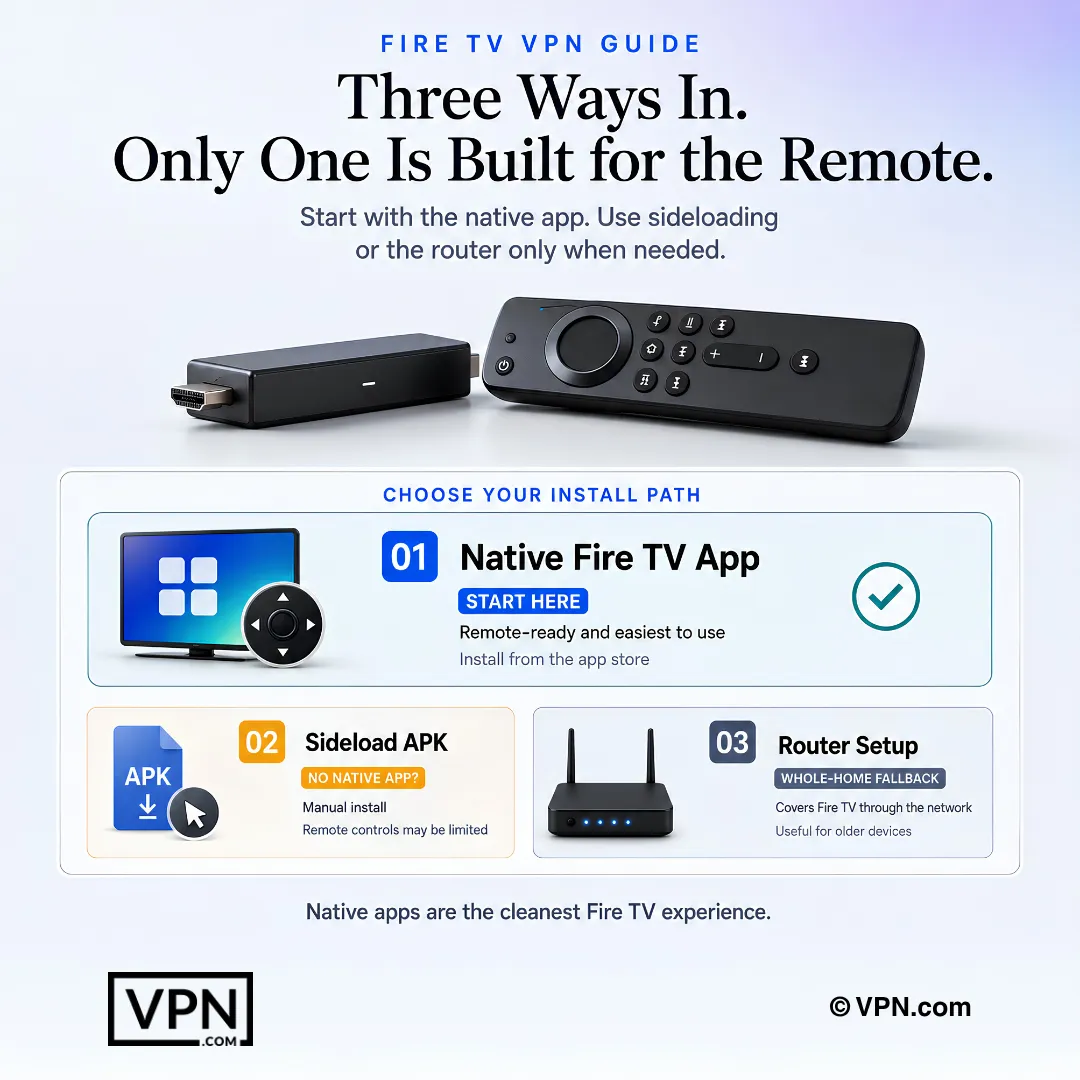
Native Amazon Appstore availability. Check whether the VPN publishes a dedicated Fire TV app. Native apps handle remote input correctly. Sideloaded Android apps often don’t.
Remote-control interface design. Open the app’s screenshots or demo videos before purchasing. Look for large buttons, a quick-connect feature, and minimal text input requirements. Entering a 24-character password with a Fire TV remote is painful.
4K streaming performance. Your VPN needs to sustain at least 25 Mbps after encryption overhead. All three providers above exceed this threshold by a wide margin on WireGuard-based protocols.
Sideload compatibility. If your preferred VPN lacks an Appstore listing, confirm it supports sideloading via the Downloader app or ADB. Not all APK files work on Fire OS without modification.
Router-level fallback. For older Fire TV models that can’t run VPN apps natively, configuring the VPN on your router protects every device on your network. This approach also benefits smart TVs, game consoles, and IoT devices that lack VPN support.
The entire process takes under three minutes. This is the recommended method for ExpressVPN, NordVPN, and Surfshark.
Use this method if your VPN doesn’t have an Amazon Appstore listing.
Important: Sideloaded apps may not respond correctly to the Fire TV remote. You might need the Mouse Toggle app (also available via sideloading) to simulate a cursor.
For whole-home protection, including older Fire TV models that can’t run VPN apps, set up the VPN directly on your router. ExpressVPN, NordVPN, and Surfshark all provide router-specific firmware or setup guides for popular router brands like Asus, Netgear, and TP-Link.
This approach encrypts traffic from every connected device automatically. The downside: switching server locations requires logging into your router’s admin panel.
Buffering or low resolution after connecting. Switch to a WireGuard-based protocol (Lightway for ExpressVPN, NordLynx for NordVPN). OpenVPN adds more encryption overhead and can drop 4K streams to 720p on slower connections.
VPN app won’t respond to remote input. The app was likely sideloaded and designed for touchscreens. Install Mouse Toggle for Fire TV to simulate a cursor with your remote’s directional pad.
Streaming service detects the VPN. Switch servers within the same country. Most providers rotate IP addresses regularly. NordVPN’s SmartPlay and ExpressVPN’s MediaStreamer are designed to resist detection.
VPN disconnects during long streaming sessions. Enable the kill switch in your VPN app settings. Check that your Fire TV isn’t set to sleep after inactivity, which can interrupt the VPN tunnel.
App crashes on older Fire TV hardware. Older sticks with 1 GB of RAM may struggle with VPN apps running alongside streaming apps. Close background apps before launching the VPN, or use the router-based method instead.
Pairing your Fire TV Stick with a VPN opens up a significantly larger content library while keeping your connection private and throttle-free. ExpressVPN delivers the fastest, most remote-friendly experience. NordVPN adds stronger privacy tools and SmartPlay accessing. Surfshark covers unlimited devices at the lowest price.
Pick based on your priorities: speed, privacy, or budget. All three install directly from the Amazon Appstore and stream 4K without buffering on modern Fire TV hardware.
VPN.com does not encourage or condone using VPN services to violate the terms of service of any platform. Information on this page is provided for educational purposes. Users are responsible for complying with the policies of the services they use.
Charts and reference images from our testing, free to view and share.
A VPN masks your Fire TV’s IP address and routes traffic through a server in another country, opening geo-restricted libraries like Netflix regions, BBC iPlayer, and Hulu that Fire OS’s Amazon Appstore doesn’t access on its own. It also stops ISP throttling during heavy streaming and encrypts your data on shared Wi-Fi. Fire OS is Amazon’s Android fork, so not every Android VPN app installs cleanly.
Open Search on the Fire TV home screen, type the VPN’s name, download it from the Amazon Appstore, sign in, grant network permission, then pick a server and connect. ExpressVPN, NordVPN, and Surfshark all publish native Fire TV apps, and the whole process takes under three minutes. If your VPN isn’t listed, sideload it via the Downloader app instead.
Yes. Second-generation Fire TV Stick models and earlier run slower processors, and VPN encryption overhead can drop streams from 4K to 1080p or cause buffering. Newer models like the Fire TV Stick 4K Max handle encryption with minimal performance loss. WireGuard-based protocols, ExpressVPN’s Lightway and NordVPN’s NordLynx, add less overhead than OpenVPN on constrained hardware.
NordVPN’s SmartPlay technology detected and accessed 14 streaming services in Fire TV testing, including region-locked Disney+, BBC iPlayer, and DAZN, by combining VPN encryption with Smart DNS automatically. Its NordLynx protocol delivered high throughput in testing, supporting 4K playback alongside that streaming access. ExpressVPN and Surfshark also stream 4K without buffering on modern Fire TV hardware.
NordVPN ranks #1 of 22 in our Speed Lab, aggregated from independent labs, the strongest showing among Fire TV-native options, using its NordLynx (WireGuard) protocol. ExpressVPN’s Lightway protocol also delivered high throughput in Fire TV Stick 4K Max testing, enough for simultaneous 4K HDR streams, with server switching taking about 4 seconds.
Surfshark supports unlimited simultaneous device connections on one subscription, covering multiple Fire TV Sticks plus phones and laptops without extra cost, from $2.49/month on its longest-term plan. NordVPN caps at 10 simultaneous devices and ExpressVPN at 10 to 14 depending on plan, both sufficient for smaller households but less flexible than Surfshark’s unlimited model.
This usually means the app was sideloaded and built for touchscreens rather than remote navigation. Install the Mouse Toggle app, also available via sideloading, to simulate a cursor with your remote’s directional pad. Native Amazon Appstore apps from ExpressVPN, NordVPN, and Surfshark are designed with large buttons and quick-connect features for remote-only navigation, avoiding this issue entirely.
Switch to a WireGuard-based protocol, Lightway on ExpressVPN or NordLynx on NordVPN, since OpenVPN’s heavier encryption overhead can drop 4K streams to 720p on slower connections. Older Fire TV Stick models with 1 GB of RAM may also struggle running a VPN alongside a streaming app, so close background apps first or switch to a router-level VPN setup instead.
Yes. Enable Apps from Unknown Sources under Settings, My Fire TV, Developer Options, install the free Downloader app from the Amazon Appstore, then enter your VPN provider’s direct APK URL to download and install it. Sideloaded apps may not respond correctly to the remote, so you may also need the sideloaded Mouse Toggle app to simulate a cursor.
CyberGhost starts from $2.03/month on its longest-term plan, the lowest entry price among Fire TV-native options here, backed by a 45-day money-back guarantee, longer than the 30-day standard. Surfshark starts from $2.49/month with unlimited device connections. NordVPN starts from $3.49/month and ExpressVPN from $3.26/month, both on their longest terms, adding stronger streaming or speed credentials.
CyberGhost offers the longest window at 45 days, versus the 30-day money-back guarantee standard across NordVPN, ExpressVPN, and Surfshark. Test your Fire TV setup immediately after subscribing, checking 4K playback, server switching speed, and remote responsiveness, since these device-specific issues are exactly what the guarantee period is meant to cover before committing long-term.
Yes. A VPN encrypts your traffic and shields your data from trackers, which matters especially on shared or public Wi-Fi networks. It also prevents your ISP from throttling your connection during heavy streaming sessions. NordVPN adds a kill switch that blocks all internet traffic if the VPN connection drops mid-stream, so your unencrypted activity is never exposed.
Configure the VPN directly on your router instead of the Fire TV device itself. ExpressVPN, NordVPN, and Surfshark all provide router-specific firmware or setup guides for brands like Asus, Netgear, and TP-Link. This encrypts traffic for every connected device automatically, including older Fire TV Sticks, smart TVs, and consoles, though switching server locations then requires logging into the router’s admin panel.
Switch servers within the same country first, since most providers rotate IP addresses regularly to stay ahead of detection. NordVPN’s SmartPlay and ExpressVPN’s MediaStreamer are both built specifically to resist this kind of VPN detection. If switching servers doesn’t restore access, try a different protocol, since some streaming platforms flag certain VPN protocols more aggressively than others.