Our answer#1 of 4

NordVPN
Best for Streaming#1 of 22 in our Speed Lab · SmartPlay DNS · servers in all 50 states.
Get NordVPN30-day money-back guarantee
Decision guide · Updated September 2026
Hulu is US-only and enforces it with IP blacklists, DNS filtering, and traffic analysis. A VPN needs a US IP, leak-proof DNS, and enough US servers to rotate to when one gets flagged.
NordVPN
Best for Streaming#1 of 22 in our Speed Lab · SmartPlay DNS · servers in all 50 states.
Get NordVPNThe ranking
Ordered by our overall score, aggregated from independent testing labs.



Hulu is only available in the United States due to strict content licensing agreements. Hulu’s terms of use[1] explicitly restrict access to US residents, which is enforced via IP geolocation. The moment you leave the US, your IP changes and access is blocked. The same can happen on shared networks that get flagged as VPN traffic.
For travelers or users outside the US, Hulu becomes inaccessible without a workaround. A VPN assigns you a US IP address, and Hulu then treats your connection as local. For a full breakdown of providers across all major platforms, see our best VPN for streaming guide. That page covers many services broadly; this page focuses entirely on Hulu.
The challenge is that Hulu actively detects VPN usage. Most VPNs fail here, and the ones that hold up share a specific set of capabilities.
Many users assume Hulu and Netflix block VPNs the same way. They don’t. Understanding the difference helps you pick a VPN that actually works with Hulu.
Netflix relies heavily on IP-range blocking. It identifies data center IPs associated with VPN providers and blocks entire subnets. If your VPN rotates you to a clean IP in a residential range, Netflix usually lets you through.
Hulu adds extra layers. It combines IP blacklisting with DNS-level filtering and traffic pattern analysis. Even if your IP looks clean, Hulu can flag connections where DNS queries route through non-US resolvers. This catches VPNs that split DNS traffic outside the encrypted tunnel.
Hulu also inspects traffic patterns more aggressively. Connections from a single IP address that serve dozens of simultaneous streams look different from a household connection. Hulu flags these as commercial VPN traffic and blocks the IP.
This means a VPN that works perfectly on Netflix may fail on Hulu. Three capabilities matter: full DNS leak protection, private DNS resolution through US-based servers, and enough US IPs to rotate through. Those are the things to check before you subscribe.
Speed Lab rankings below are aggregated from independent testing labs. We do not run our own speed tests. Every source and the scoring formula are listed in our methodology.
| VPN | Price | Speed Lab | US Coverage | Connections | Anti-Detection | Refund |
|---|---|---|---|---|---|---|
| NordVPN | $3.49/mo | #1 of 22 | All 50 states | 10 | SmartPlay + obfuscated servers | 30 days |
| Surfshark | $2.49/mo | #4 of 22 | Yes | Unlimited | Nexus + NoBorders | 30 days |
| ExpressVPN | $3.26/mo | #8 of 22 | 57 locations | 8 | Lightway + automatic obfuscation | 30 days |
| CyberGhost | $2.03/mo | #10 of 22 | 1,100+ servers | 7 | Streaming-labelled servers | 45 days |
| Proton VPN | $3.49/mo | #12 of 22 | Yes | 10 | Stealth protocol | 30 days |
NordVPN ranks #1 of 22 in our Speed Lab, the top position of every provider we track. SmartPlay activates automatically when it detects a streaming connection. It routes DNS queries through NordVPN’s private resolvers, which addresses Hulu’s DNS-level filtering directly.
NordVPN covers all 50 US states. That geographic spread matters for Hulu: when one IP gets blocked, you have alternatives in the same region rather than having to jump across the country and change your local channel lineup.
Dedicated IP option: NordVPN offers a dedicated IP add-on for $3.69/mo. This gives you a static US IP that only you use. Hulu is less likely to flag single-user IPs than shared VPN addresses, which get hit as soon as several people stream through them at once. See NordVPN’s current deal
Surfshark ranks #4 of 22 in our Speed Lab. At $2.49/mo it undercuts NordVPN and supports unlimited simultaneous devices, which is the main reason to pick it for a household rather than a single traveller.
Surfshark’s Nexus technology routes your traffic through a network of servers rather than a single endpoint, which makes the connection harder to fingerprint. NoBorders mode activates when it detects network restrictions, which helps on hotel Wi-Fi and corporate networks. Check Surfshark’s current pricing
ExpressVPN ranks #8 of 22 in our Speed Lab. Its distinguishing feature for Hulu is MediaStreamer, a Smart DNS service that works on devices which can’t run VPN apps natively, such as older Roku models and some smart TVs. MediaStreamer doesn’t encrypt traffic, but it reroutes DNS queries so those devices can reach Hulu.
Lightway is ExpressVPN’s own protocol, built to connect quickly and reconnect cleanly when a network drops. The apps apply obfuscation automatically when they detect a network interfering with VPN traffic, so restrictive hotel and airport Wi-Fi needs no manual configuration. ExpressVPN operates 57 US server locations.
CyberGhost ranks #10 of 22 in our Speed Lab. Its app labels specific servers as Hulu-optimized, which removes the guesswork of hunting for a working connection. That labelling is the practical draw here rather than raw throughput.
CyberGhost also offers a 45-day money-back guarantee, 15 days longer than every other provider on this page. With 1,100+ US servers there are plenty of alternatives to switch to if a given IP stops working.
Proton VPN ranks #12 of 22 in our Speed Lab, which puts it mid-table rather than among the fastest options here. Its Stealth protocol wraps VPN traffic in TLS, so the connection resembles ordinary HTTPS browsing, which is aimed squarely at traffic pattern analysis of the kind Hulu applies.
Proton VPN operates 15,000+ servers globally with US coverage. All apps are open-source and independently audited. If privacy credentials matter more to you than the speed ranking, that is the trade this provider offers.
Hulu offers two distinct products, and VPN behaviour differs between them.
Hulu on-demand streams pre-recorded content from Hulu’s CDN (content delivery network). VPN connections have more time to buffer and adjust quality, so a slower connection degrades gracefully.
Hulu + Live TV streams real-time broadcasts. It requires lower latency and more consistent throughput. Live TV is also more location-sensitive. Hulu uses your IP to determine your local channels (ABC, NBC, FOX, CBS affiliates). If your VPN connects to a server in Dallas, you’ll see Dallas local stations.
Live TV is harder on VPNs for three reasons:
For Hulu Live TV, weight the Speed Lab ranking more heavily than you would for on-demand. NordVPN sits at #1 of 22, and SmartPlay handles the DNS side without manual configuration.
Mobile devices send GPS coordinates alongside your IP. If GPS says London but your IP says New York, Hulu flags the mismatch. Disabling location services eliminates this conflict.
Fire TV caches DNS data aggressively. Force-stopping Hulu and clearing its cache forces the app to re-resolve DNS through your VPN tunnel.
Roku doesn’t support VPN apps natively. You have two options:
Option A: Smart DNS. ExpressVPN’s MediaStreamer works on Roku. Configure your Roku’s DNS settings to use ExpressVPN’s DNS addresses. This accesses Hulu without encrypting traffic. It’s faster but offers no privacy protection.
Option B: Router-level VPN. Install your VPN on a compatible router (Asus, Netgear, or a dedicated VPN router). All traffic from your Roku routes through the VPN automatically. NordVPN and ExpressVPN offer router firmware and setup guides.
Router-level VPNs protect every device on your network. The downside is that all traffic routes through the VPN, which may slow non-Hulu devices.
Hulu’s geo-restrictions are strict, and the VPNs most likely to work around them are the ones with private US DNS resolution, leak protection, and enough US IPs to rotate through.
NordVPN is the strongest overall pick: #1 of 22 in our Speed Lab, coverage in all 50 states, and SmartPlay handling DNS automatically. Surfshark is the value option at $2.49/mo with unlimited devices. ExpressVPN is the one to choose if you need MediaStreamer for a Roku or smart TV. CyberGhost labels servers for streaming and gives you 45 days to change your mind. Proton VPN is the pick if audited, open-source privacy tooling matters more to you than its mid-table speed ranking.
All five back paid plans with a money-back guarantee (30 days standard, 45 for CyberGhost). Test them with your own Hulu setup and request a refund if they don’t work for you. If you also stream on Netflix or Disney+, see our best VPN for streaming guide for cross-platform comparisons.
VPN.com does not encourage or condone using VPN services to violate the terms of service of any platform. Information on this page is provided for educational purposes. Users are responsible for complying with the policies of the services they use.
Charts and reference images from our testing, free to view and share.
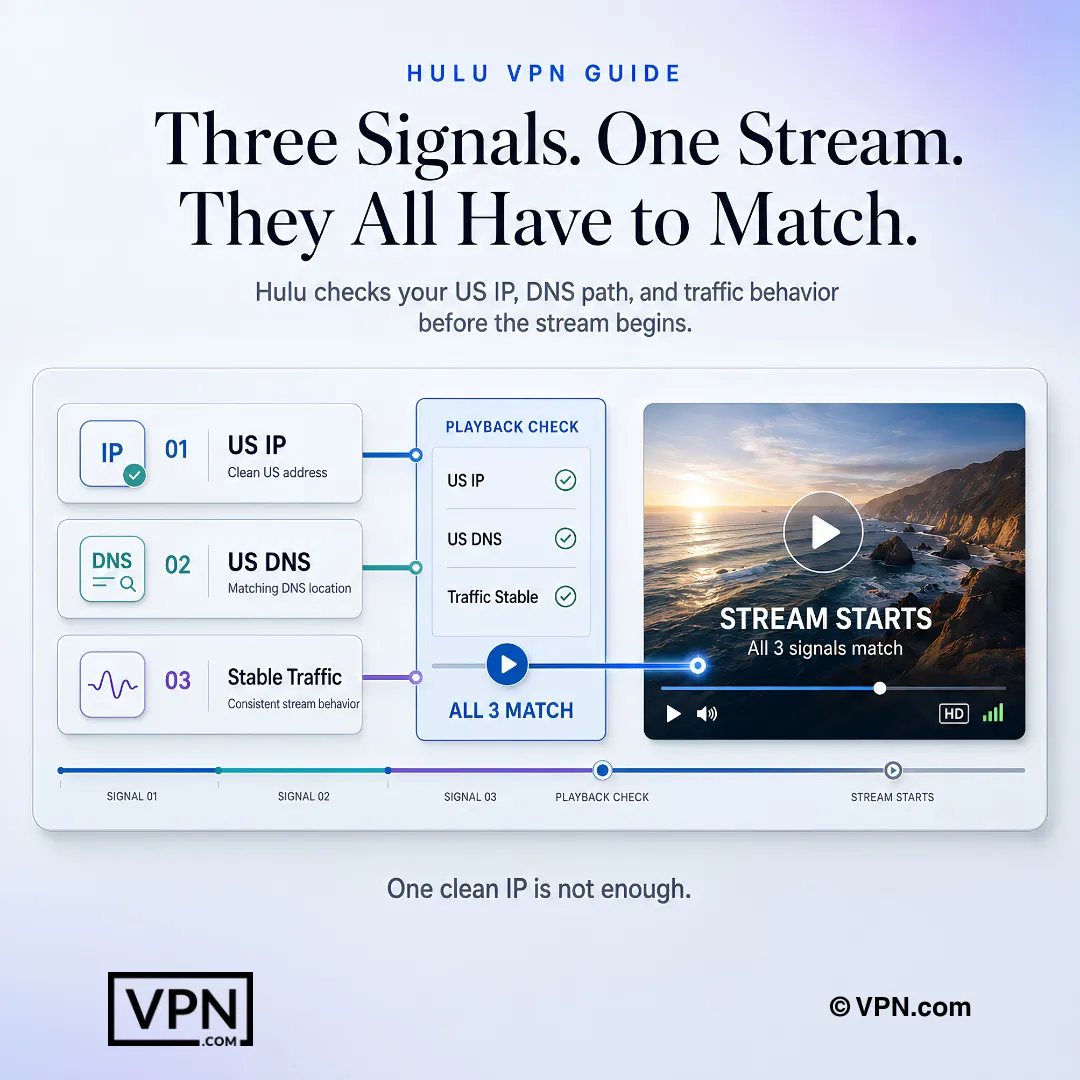
Netflix mainly blocks known VPN IP ranges, but Hulu layers on DNS-level filtering and traffic pattern analysis on top of IP blacklists. It flags DNS queries routed through non-US resolvers and identifies single IPs serving dozens of simultaneous streams as commercial VPN traffic. That’s why a VPN that passes Netflix can still trigger Hulu’s proxy error message.
NordVPN ranks #1 of 22 in our Speed Lab, followed by Surfshark at #4, ExpressVPN at #8, CyberGhost at #10, and Proton VPN at #12. Those ranks are aggregated from independent testing labs rather than tests we run ourselves, and the sources are listed in our methodology. Treat the rank as a comparative sort order, not as a speed you will personally see on Hulu.
It matters because Hulu flags connections where DNS queries route through non-US resolvers even when your IP looks clean. If your VPN sends DNS outside the encrypted tunnel, Hulu can identify the mismatch regardless of how clean the exit IP is. NordVPN’s SmartPlay and Proton VPN’s Stealth protocol both route DNS through private resolvers specifically to defeat this check.
Live TV demands tighter latency and steadier throughput than on-demand, because buffering during a broadcast is disruptive and there is no buffer ahead of it to absorb a dip. That makes the Speed Lab ranking worth weighting more heavily for Live TV, where NordVPN sits at #1 of 22. For on-demand, the connection has room to adjust quality, so ranking matters less.
All five providers back paid plans with a money-back guarantee, though the window varies. NordVPN, Surfshark, ExpressVPN, and Proton VPN each offer 30 days, while CyberGhost extends that to 45 days, the longest of the group. Test your actual Hulu setup within that window and request a refund through support if access proves unreliable.
Surfshark supports unlimited simultaneous connections, making it the strongest choice for multi-device Hulu households. NordVPN and Proton VPN both cap at 10 devices, ExpressVPN allows 8, and CyberGhost limits you to 7. Match the device count to how many screens in your household actually stream Hulu simultaneously.
Roku doesn’t support VPN apps natively, so you need Smart DNS or a router-level VPN instead. ExpressVPN’s MediaStreamer DNS service works directly on Roku but doesn’t encrypt traffic. Alternatively, install NordVPN or ExpressVPN on a compatible router like Asus or Netgear so every device on the network, including your Roku, routes through the VPN automatically.
Mobile devices send GPS coordinates alongside your IP address, and Hulu cross-checks the two. If your VPN shows a US IP but your phone’s GPS reports another country, Hulu flags the mismatch. On iPhone, go to Settings, then Privacy, then Location Services and disable access for Hulu; on Android, use Apps, then Permissions, then Location, before reconnecting.
Switch to a different US server first, since Hulu typically blocks specific IPs rather than the VPN protocol itself. Clear your browser or app cache and cookies, since Hulu stores location data there that can persist across server switches. If you’re on CyberGhost, move to another server labelled for streaming rather than a general-purpose one.
It can be, since shared VPN IPs get flagged faster when multiple users stream from the same address at once. NordVPN’s dedicated IP add-on gives you a static US address only you use, for $3.69/mo on top of the subscription. It’s a reasonable upgrade if you stream Hulu daily and keep hitting blocked shared IPs.
Hulu’s subscriber agreement restricts access to US residents and enforces this through IP geolocation, so accessing Hulu from abroad through a VPN runs against its terms of service. The providers listed here use encryption, DNS leak protection, and no-logs infrastructure, so the privacy risk sits with your VPN choice, not the access method itself. VPN.com doesn’t encourage violating any platform’s terms.
Using a VPN itself is legal in the US and most countries; the gray area is Hulu’s own subscriber agreement, which restricts service to US residents and enforces that through IP geolocation and traffic analysis. Violating those terms is a contract issue with Hulu, not a criminal one, though it can still lead to account restrictions if detected repeatedly.
We don’t run our own speed tests. Speed Lab rankings aggregate published results from independent testing labs, and the providers on this page are selected on documented capabilities that bear on Hulu specifically: private DNS resolution, leak protection, US server coverage, and Smart DNS support for devices that can’t run a VPN app. Every source and the full scoring formula are published on our methodology page.